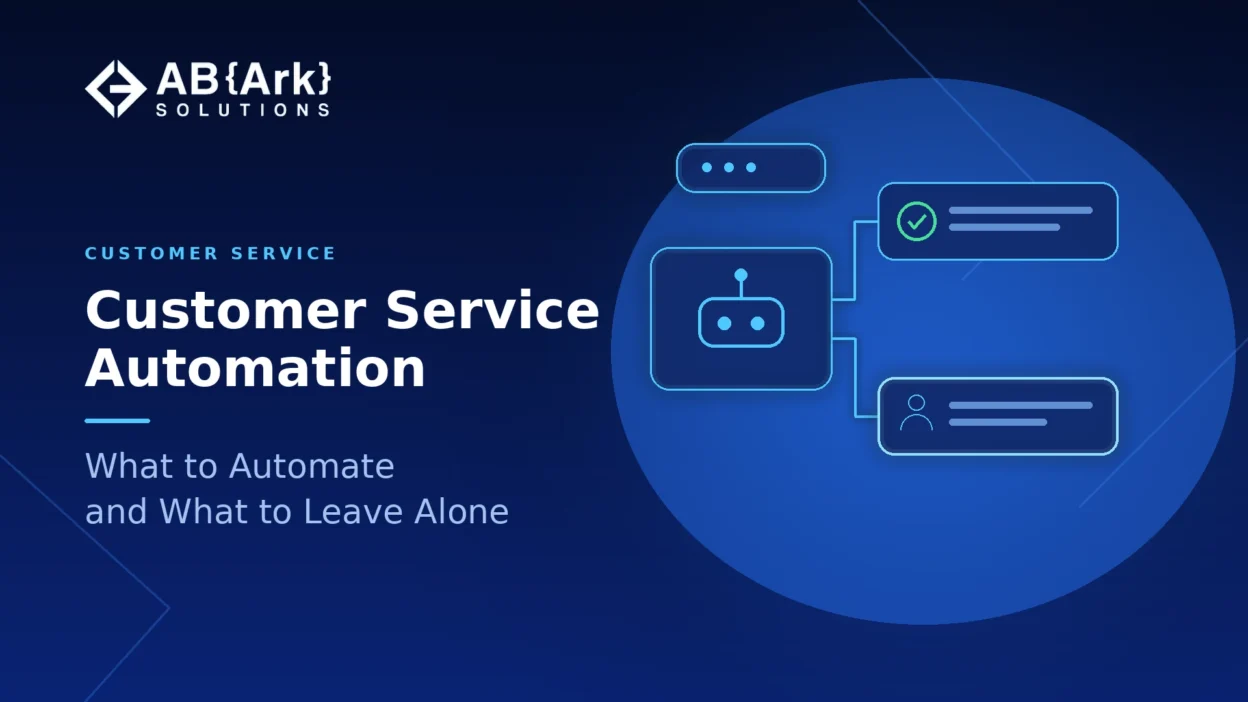
Customer service automation, whether through AI chatbots or other support automation, works best on requests that are frequent, simple and low in emotional stakes: order status, password resets, booking changes, routing, and answers found in your help content. Leave complaints, cancellations, billing disputes, vulnerable customers and anything requiring judgment or empathy with people, supported by AI rather than replaced by it. Whatever you automate, make reaching a human easy and pass the full context when you do.
Key Takeaways
- Automate by request type, not by channel. A chatbot, a voice agent and an email auto-reply should all follow the same rules about what they handle.
- Customers accept AI when it resolves the issue and a person is easy to reach. Gartner’s 2026 survey found 87% say a human option is essential when companies use generative AI.
- A bad automated experience is costly: only 27% of customers in the same survey would try a chatbot again after a negative one.
- Start with high-volume, low-stakes requests that have a proven resolution path, then expand only where results hold up.
- Use AI to support people on sensitive cases, by summarizing, drafting and finding answers, rather than to replace them.
Talk to Our Team About Your Project ->
What Customer Service Automation Covers, and What Customers Want From It
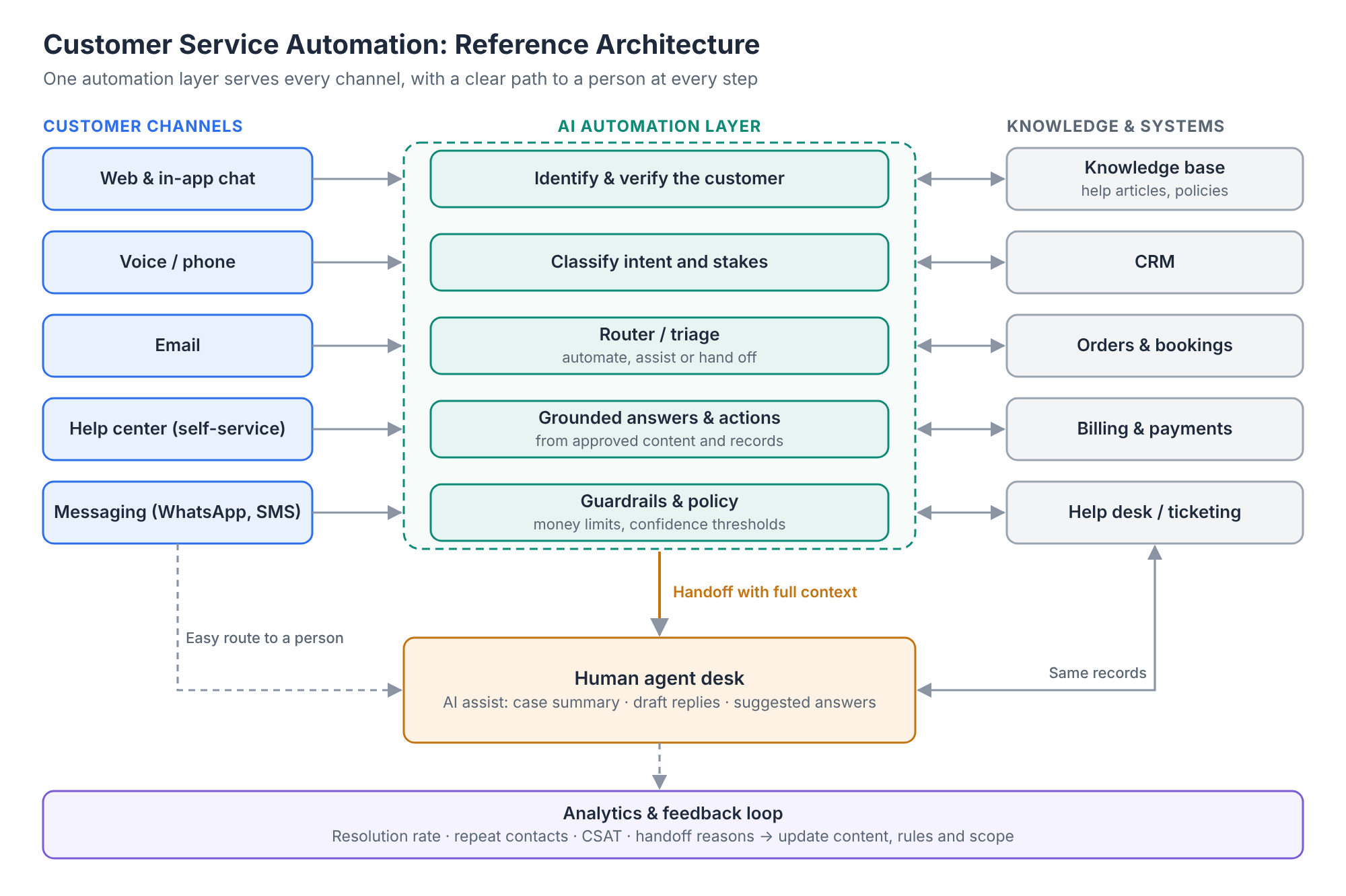
Customer service automation is the use of software to answer, route or resolve customer requests without a person handling every step. In 2026 it spans self-service help centers, AI chatbots and voice agents, automated ticket routing and tagging, proactive notifications, and AI tools that help human agents by drafting replies, summarizing cases and suggesting answers.
Customer attitudes are mixed and conditional. In a Gartner survey of 3,566 B2B and B2C customers conducted in February and March 2026, 50% said their interactions are easier when companies use GenAI, yet 87% said it is essential to provide an option to reach a human agent (published August 2026). Customers who were unwilling to use AI most often said the ability to switch to a person would change their mind.
The same survey shows how fragile trust in automation is. Gartner reported that 49% of customers said they would have used a chatbot if offered, but only 7% used one in their most recent service interaction, and only 27% would try a chatbot again after a negative experience (September 2026). Gartner’s advice was to start with issue types that have a proven high resolution rate and expand scope only once performance is reliable.
Service leaders are drawing the same conclusion. Gartner found that just 20% of organizations reported reduced agent headcount due to AI in a survey of 321 service leaders conducted in October 2025, and predicts that by 2028 over half of customer service organizations will double technology spend without an equivalent reduction in staff. Automation is reshaping service work more than removing it.
Manual vs Automated Customer Service: How It Has Changed
Not long ago, customer service was almost entirely manual. Customers phoned a call center or sent an email, waited in a queue, and an agent looked up the answer in several systems before replying. Service was limited to business hours, capacity grew only by hiring, and the quality of an answer depended on which agent picked up the request.
Automation changed the shape of that work rather than removing it. Self-service and chatbots now answer routine questions at any hour, routing sends each request to the right team in seconds, and AI tools give agents a summary and a draft reply before they start. The table below shows how the main parts of service have shifted.
| Aspect | Manual customer service | Automated customer service |
|---|---|---|
| Availability | Business hours, limited by staffing | 24/7 for routine requests, with people available for the rest |
| Speed of first response | Minutes to days, depending on queue length | Seconds for self-service and bot answers |
| Routing and triage | Agents or supervisors read and assign each request | Software tags, prioritizes and routes requests automatically |
| Consistency | Varies by agent knowledge and experience | The same approved answer every time, drawn from help content |
| Scaling with demand | More volume means hiring and training more agents | Routine volume absorbed by software; people focus on exceptions |
| Role of the agent | Handles every request end to end | Handles complex, sensitive and high-value cases, supported by AI |
| Main risk | Long waits and inconsistent answers | Customers trapped in automation that cannot solve their problem |
The lesson from this shift is that the best results come from combining the two: automation for speed and scale on predictable requests, and people for judgment and empathy. The rest of this guide shows where to draw that line.
The Customer Service Automation Decision Map
Two questions decide how far to automate a customer request: how complex is it to resolve, and how much is at stake for the customer, emotionally or financially, if it goes wrong? Requests that are simple and low-stakes are the place to start. Requests that are complex and high-stakes belong with people.
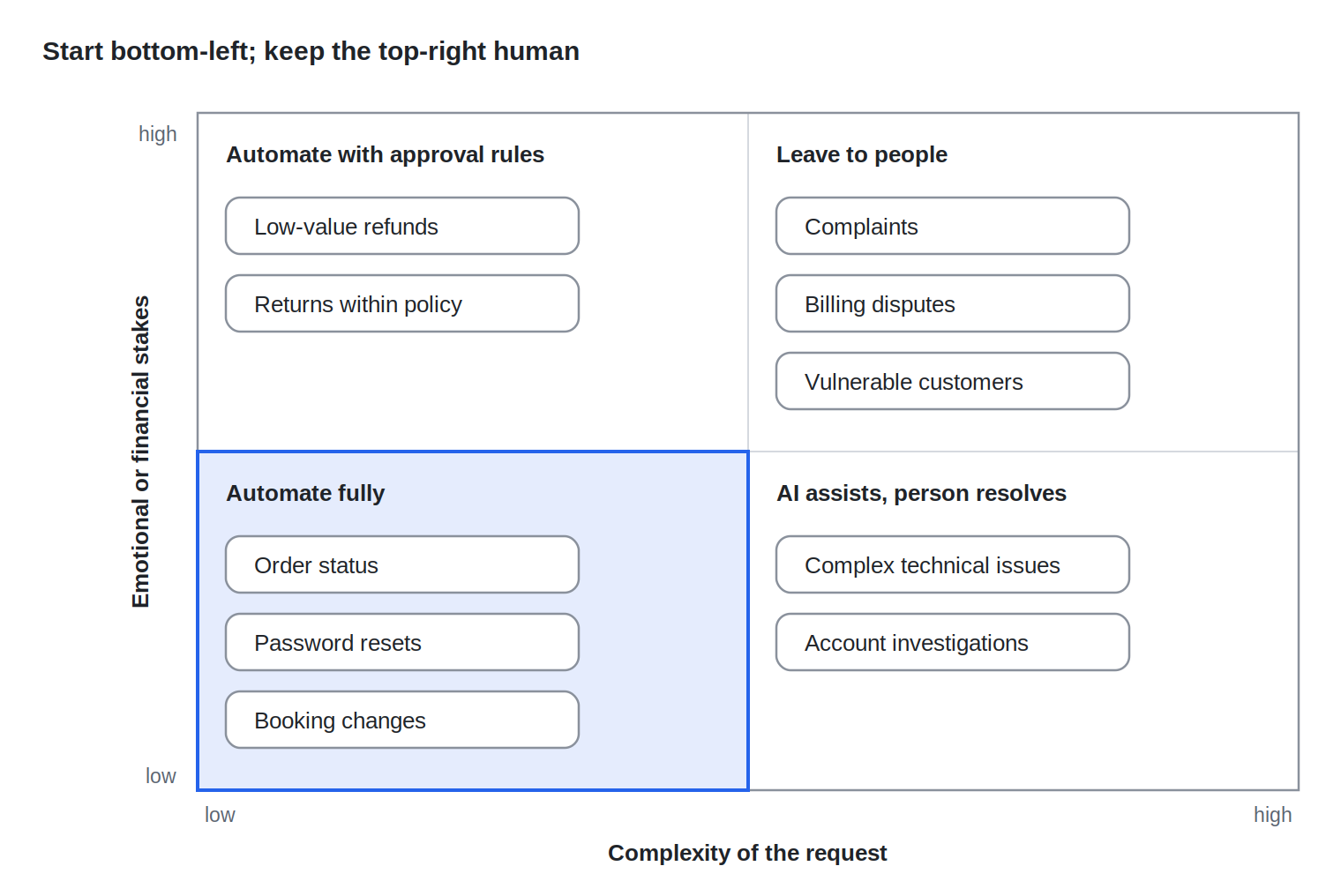
The example requests are placed by AB Ark’s editorial judgment, not measured data; the same request can move between quadrants depending on your customers and policies. A refund is low-stakes for a $10 subscription and high-stakes for a $2,000 flight, so map your own contact reasons rather than copying the examples.
What to Automate: A Task-by-Task Guide
The requests worth automating first share four traits: they arrive often, follow a predictable path, can be resolved with data your systems already hold, and carry little emotional or financial risk if something goes wrong. The table below sorts common customer service tasks by how far to automate them. It is AB Ark’s editorial guidance, to be adjusted against your own volumes and resolution data.
| Task | Recommended level | Why | Safeguard |
|---|---|---|---|
| Order, delivery or ticket status | Fully automate | High volume, answer comes straight from your systems | Escalate if the data shows a delay or exception |
| Password resets and account access | Fully automate | Standard, secure flows already exist | Strong identity checks; human route for locked-out users |
| Answers from help center content | Fully automate | Repetitive questions with documented answers | Cite the source article; hand off when no confident answer is found |
| Appointment booking and changes | Fully automate | Rules-based, calendar-driven | Human option for special requirements |
| Ticket routing, tagging and prioritization | Fully automate (behind the scenes) | Speeds every request without customer exposure | Review misroutes weekly |
| Proactive notifications (delays, outages, renewals) | Fully automate | Prevents contacts before they happen | Route customer replies to these notifications to a person |
| Simple returns and exchanges within policy | Automate with approval rules | Clear rules, but edge cases are common | Policy checks in code; person for anything outside policy |
| Low-value refunds and credits | Automate with approval rules | Moves money, so needs limits | Amount caps, eligibility checks and audit logs |
| Plan or subscription changes | Automate with handoff | Usually simple, sometimes a retention moment | Route cancellations to a person |
| Drafting replies, summarizing cases, suggesting answers | Assist human agents | Speeds agents without removing judgment | Agent reviews before sending |
The common thread is that automation handles the predictable path and hands off the moment a request leaves it. Gartner’s guidance on chatbots points the same way: identify issue types with a proven high resolution rate, tell customers clearly what the bot can do, and widen scope only when performance is reliable.
Refunds and other money-moving actions deserve particular care: the AI can gather the facts and recommend an outcome, but eligibility, limits and the payment itself should be enforced by deterministic rules, with a person approving anything above a set threshold. AB Ark’s AI agent approval workflow guide sets out the checks to run before an automated system issues a refund.
Get a Custom Project Cost & Timeline Estimate ->
What to Leave to People, and Why
Some customer service work should stay with people even when AI could technically produce an answer. These are requests where the customer is upset, vulnerable or at a decision point, where the outcome depends on judgment or discretion, or where a wrong answer is expensive. Gartner’s service leaders describe the same division of labor: AI for efficiency, humans for context, empathy and judgment.
| Request type | Why a person should handle it | How AI can still help |
|---|---|---|
| Complaints and escalations | The customer needs to feel heard; tone and discretion matter more than speed | Summarize the history so the customer does not repeat themselves |
| Cancellations and retention conversations | A real decision point where an offer, an apology or flexibility can change the outcome | Show the agent the customer’s value, history and eligible offers |
| Billing disputes and chargebacks | Money, evidence and policy interpretation are involved | Pull invoices, payment records and policy clauses into one view |
| Vulnerable customers (bereavement, health, financial hardship) | Requires empathy, care and sometimes regulatory obligations | Detect signals early and route straight to trained staff |
| Complex technical issues | Diagnosis needs investigation and back-and-forth | Suggest likely causes and relevant knowledge articles |
| Legal, safety or regulatory matters | Wrong answers carry legal or safety risk | Flag and route immediately; never answer automatically |
| High-value or strategic accounts | The relationship matters more than handling time | Prepare account context before every contact |
Two signals should trigger an immediate handoff wherever automation is used: the customer asks for a person, and the customer shows frustration, distress or repeated failure to get an answer. Making customers fight the bot to reach someone erodes trust quickly; Gartner’s 2024 customer survey found that difficulty reaching a person was customers’ top concern about AI in customer service.
Creating Your Own Customer Service Automation
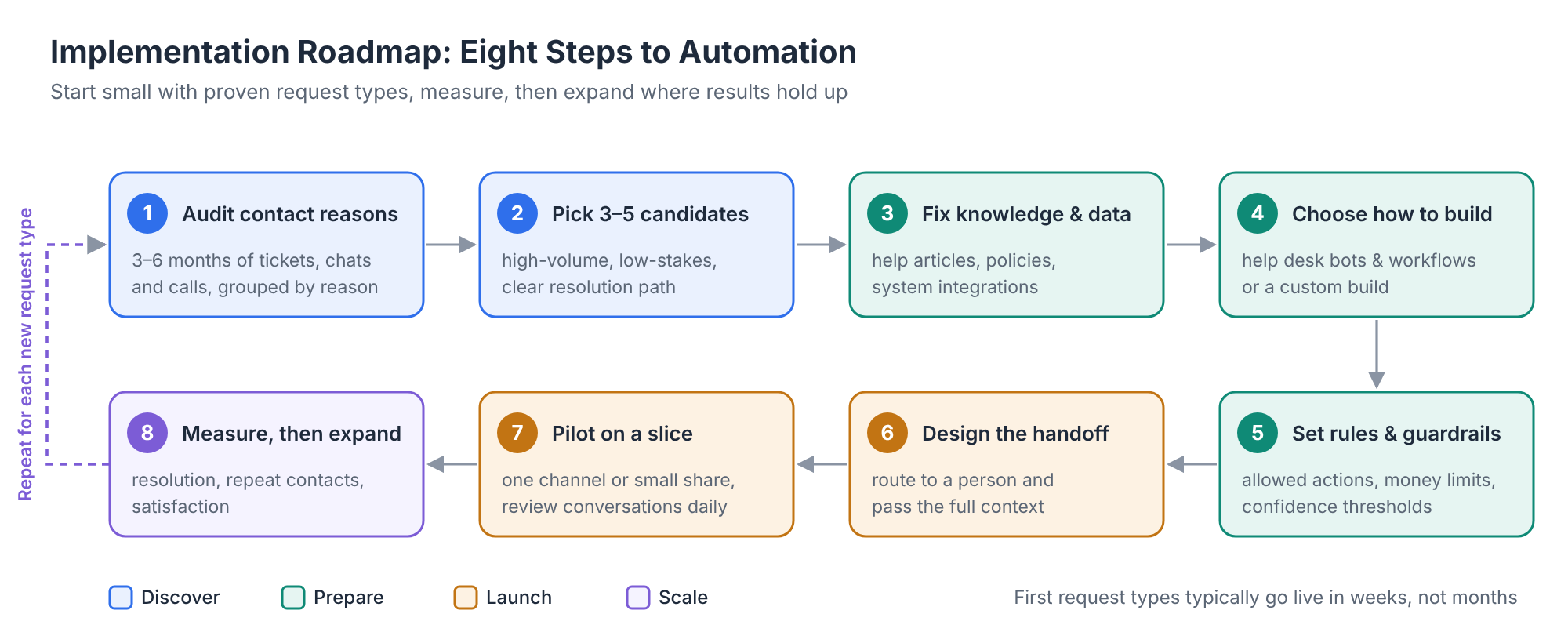
Whether you configure the tools in your existing help desk or commission a custom build, the same sequence keeps the project focused on resolving requests rather than deflecting them. Eight steps take you from raw ticket data to a working automation:
- 1. Audit your contact reasons: Export three to six months of tickets, chats and call logs, group them by reason, and note the volume, resolution path and emotional stakes of each.
- 2. Pick three to five starting candidates: Choose high-volume, low-stakes requests with a clear answer, using the task table above as a guide, and set aside anything that needs judgment.
- 3. Fix your knowledge and data first: Write or update the help articles, policies and system integrations the automation will rely on. Automation built on outdated content gives confident wrong answers.
- 4. Choose how to build it: Use the built-in bots and workflows of your help desk platform for simple FAQs and routing, or a custom build when the automation must read order, billing or booking systems, follow your own rules, or work across chat, voice and email.
- 5. Write the rules and guardrails: Define what the automation may and may not do, the limits for money-moving actions, the confidence level below which it must hand off, and the topics it should never answer.
- 6. Design the handoff before launch: Decide how customers reach a person and what context the agent receives, following the handoff rules in the next section.
- 7. Pilot on a slice of traffic: Launch to one channel or a small share of customers, review conversations daily at first, and fix gaps in content and rules before widening scope.
- 8. Measure, then expand: Track resolution, repeat contacts and satisfaction, and add new request types only when the current ones perform reliably.
Most teams can run this cycle for their first few request types in weeks rather than months, then repeat it as each new request type proves itself.
Designing the Handoff, and Measuring Whether Automation Works
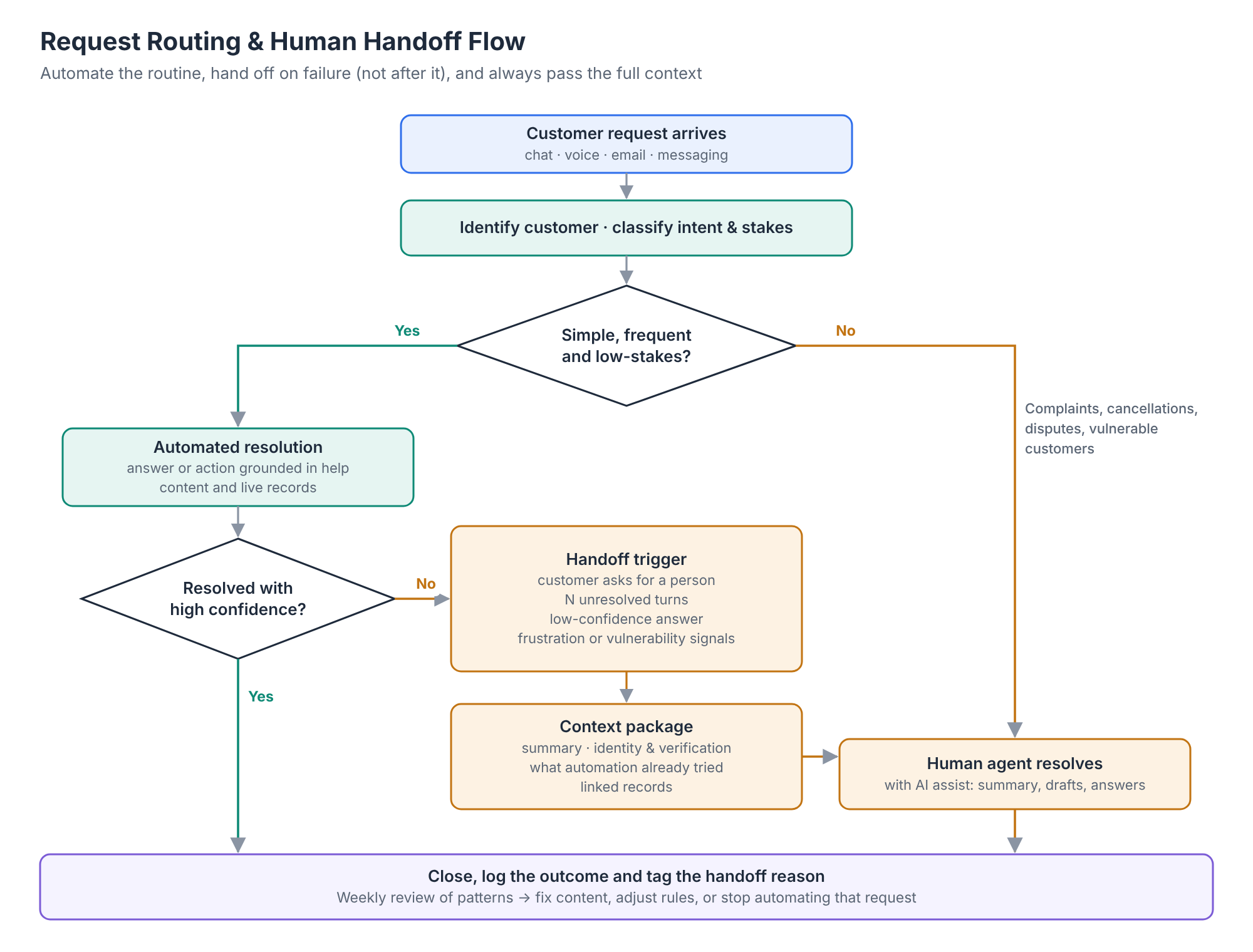
The handoff from automation to a person is where customer service automation often succeeds or fails. A good handoff is easy to trigger, fast, and carries the full context, so the customer never repeats themselves. A bad one hides the human option, loses the conversation history, or drops the customer into a queue with no explanation.
Five rules for a good handoff:
- 1. Always offer a way out: Show how to reach a person from the start, and honor the request immediately when a customer asks for one.
- 2. Hand off on failure, not after it: Trigger a transfer after a set number of unresolved turns, on low-confidence answers, or on signs of frustration, before the customer gives up.
- 3. Pass the context: Send the agent a summary, the customer’s identity and verification status, what the automation already tried, and any records it found.
- 4. Set expectations: Tell the customer who will help, through which channel, and roughly how long it will take.
- 5. Learn from every handoff: Tag the reason for each transfer and review the patterns weekly; recurring reasons show what to fix or what to stop automating.
Metrics that show whether automation helps
| Metric | What it tells you | Watch out for |
|---|---|---|
| Resolution rate (issue solved without a follow-up contact) | Whether automation actually solves problems | Counting “contained” chats that ended without resolution |
| Repeat contact rate within 7 days | Hidden failures that customers bring back through another channel | Rises when deflection is mistaken for resolution |
| Handoff rate and handoff reasons | Where automation reaches its limits | A very low rate may mean the human option is hidden |
| Customer satisfaction for automated vs human-handled contacts | Whether customers accept the automated experience | Survey only resolved contacts and you will overstate it |
| Time to resolution, end to end | The customer’s real experience, including handoffs | Fast bot replies can hide slow overall resolution |
| Agent handling time on escalated cases | Whether the context passed at handoff is useful | Rising handle time can signal poor summaries |
The most important distinction is between deflection and resolution. A chatbot that keeps customers away from agents without solving their problem looks efficient on a dashboard and drives them to another channel, or to a competitor.
If you are planning chatbots or voice agents with these handoff rules built in, AB Ark’s chatbot and LLM solutions page shows the kinds of customer support automation it builds, including an AI call agent for bookings and inquiries.
An AB Ark Implementation Lens
AB Ark’s AI call agent case study applies the automate-the-routine principle to the phone line: a 24/7 voice assistant that answers calls instantly, manages bookings and supports customers in natural conversation. Bookings and routine inquiries are exactly the frequent, low-stakes requests this article recommends automating first. The case study summary does not describe how calls are handed off to staff, so check that design against the handoff rules above for any similar build.
FAQs
What is customer service automation?
Customer service automation is the use of software, including self-service help centers, chatbots, voice agents, ticket routing and AI agent-assist tools, to answer, route or resolve customer requests with less manual work. It ranges from fully automated answers for simple questions to AI that supports human agents on complex cases.
What percentage of customer service can be automated?
There is no reliable universal figure; it depends on your mix of requests, data quality and how well your systems are connected. A practical approach is to analyze your own contact reasons, identify the high-volume, low-risk ones with a clear resolution path, and measure resolution rates as you automate them rather than setting a target percentage in advance.
Do customers prefer AI or human customer service?
Customers are open to AI when it solves their problem quickly and a person is easy to reach. In Gartner’s 2026 customer survey, 50% said GenAI makes interactions easier, but 87% said access to a human agent is essential. Customers lose patience quickly when automation blocks that route.
Will automation replace customer service agents?
Current evidence points to reshaping rather than replacement. Gartner found that only 20% of service organizations reported reduced headcount due to AI, and 85% of service leaders say they are expanding human agents‘ responsibilities toward complex, higher-value work while AI handles simpler requests.
Where should a small business start with customer service automation?
Start with a searchable help center and automated answers to your five to ten most common questions, plus automated order or booking updates. Add a chatbot only once the help content is solid, and make sure every automated channel offers a clear way to reach a person.
The Rule of Thumb
Automate customer service requests that are frequent, predictable, resolvable from your own data and low in emotional or financial stakes. Keep people on complaints, cancellations, disputes, vulnerable customers and anything that needs judgment, and give them AI that summarizes and drafts. Make the human option visible, hand off with full context, and measure resolution rather than deflection.
The best customer service automation is not the one that handles the most contacts. It is the one that resolves the simple ones and gets the hard ones to the right person fast.
Schedule a Free Consultation Call ->

CTO & Co-founder At AB Ark Solutions