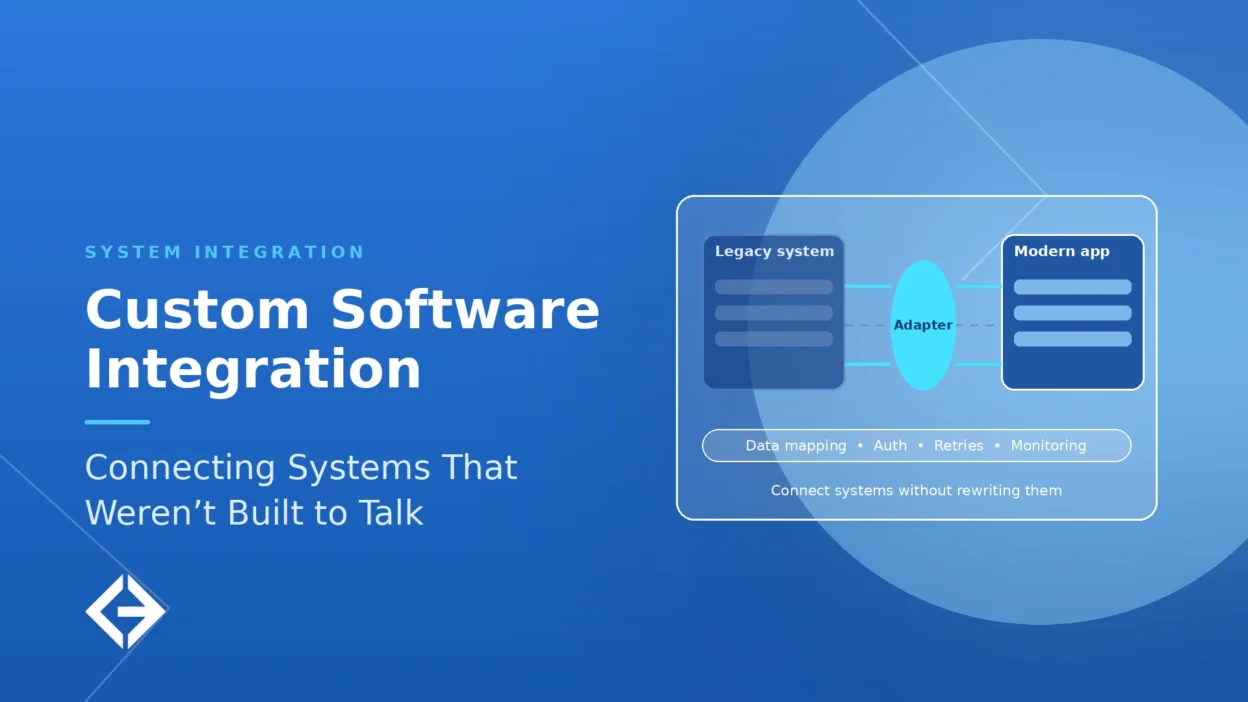

Custom software integration is the work of building the connections that let separate systems exchange data and trigger actions in each other when no ready-made connector fits. The right approach depends on how fast data must move and how different the systems are: APIs for real-time calls, messaging for decoupled events, batch transfers for bulk data, and adapters for legacy systems without APIs. MuleSoft’s 2025 survey found the average organization uses 897 applications but integrates only 29% of them.
Key Takeaways
- Choose by need: a prebuilt connector for standard cases, an integration platform for many standard apps, and custom integration for legacy systems, unusual data, strict performance or security needs, or logic that is core to your business.
- Pick an integration pattern per data flow, not one pattern for everything: API calls, an API layer, event-driven messaging, batch or file transfer, or change data capture.
- Put an adapter, known as an anti-corruption layer, between modern systems and a legacy system so the legacy data model does not leak into new code. Use the strangler fig pattern when you plan to replace the legacy system gradually.
- Design for failure from the start: bounded retries, idempotent operations, dead-letter queues, timeouts, circuit breakers, and reconciliation jobs.
- Treat integrations as an attack surface. Several OWASP API Security Top 10 risks apply directly: authorization failures, unrestricted resource consumption, and unsafe consumption of APIs.
Talk to Our Team About Your Project ->
What Is Custom Software Integration?
Custom software integration is the design and construction of code, services, and data pipelines that connect two or more systems so they work as one process. It covers synchronizing records between a CRM and an ERP, feeding a legacy system’s data to a modern app, exposing an old database through an API, or connecting an AI agent to the systems it needs to act on.
It differs from configuring a prebuilt connector in one way: you are writing and owning the logic that translates between systems. That logic decides how fields map, what happens when data is missing or duplicated, how failures are retried, and who is alerted. Done well, nobody notices it. Done poorly, it becomes the first place a business process breaks.
Why Are Most Business Systems Still Disconnected?
Applications multiply faster than integrations. MuleSoft’s 2025 Connectivity Benchmark Report, based on a survey of 1,050 IT leaders worldwide, found the average organization uses 897 applications, and the full report adds that 45% use 1,000 or more. Yet only about 29% of those applications are integrated, according to Salesforce’s write-up.
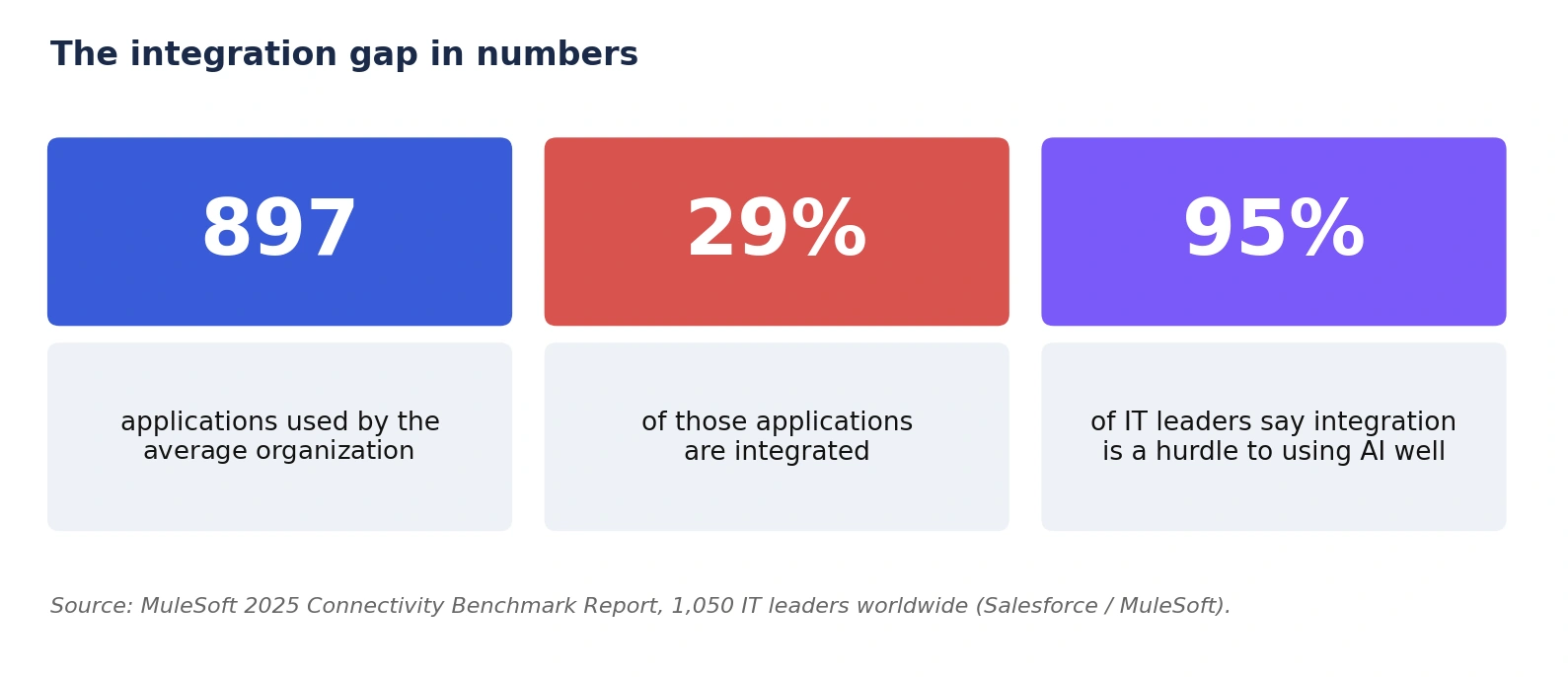 The consequence now reaches beyond reporting. The same survey found that 95% of IT leaders report integration as a hurdle to implementing AI effectively. AI agents and assistants are only as useful as the systems they can read from and write to, so integration is becoming the limiting factor for automation.
Connector, Platform, or Custom: Which Should You Use?
Most organizations need a mix. Use the cheapest option that handles the flow reliably, and build custom only where the others fall short.
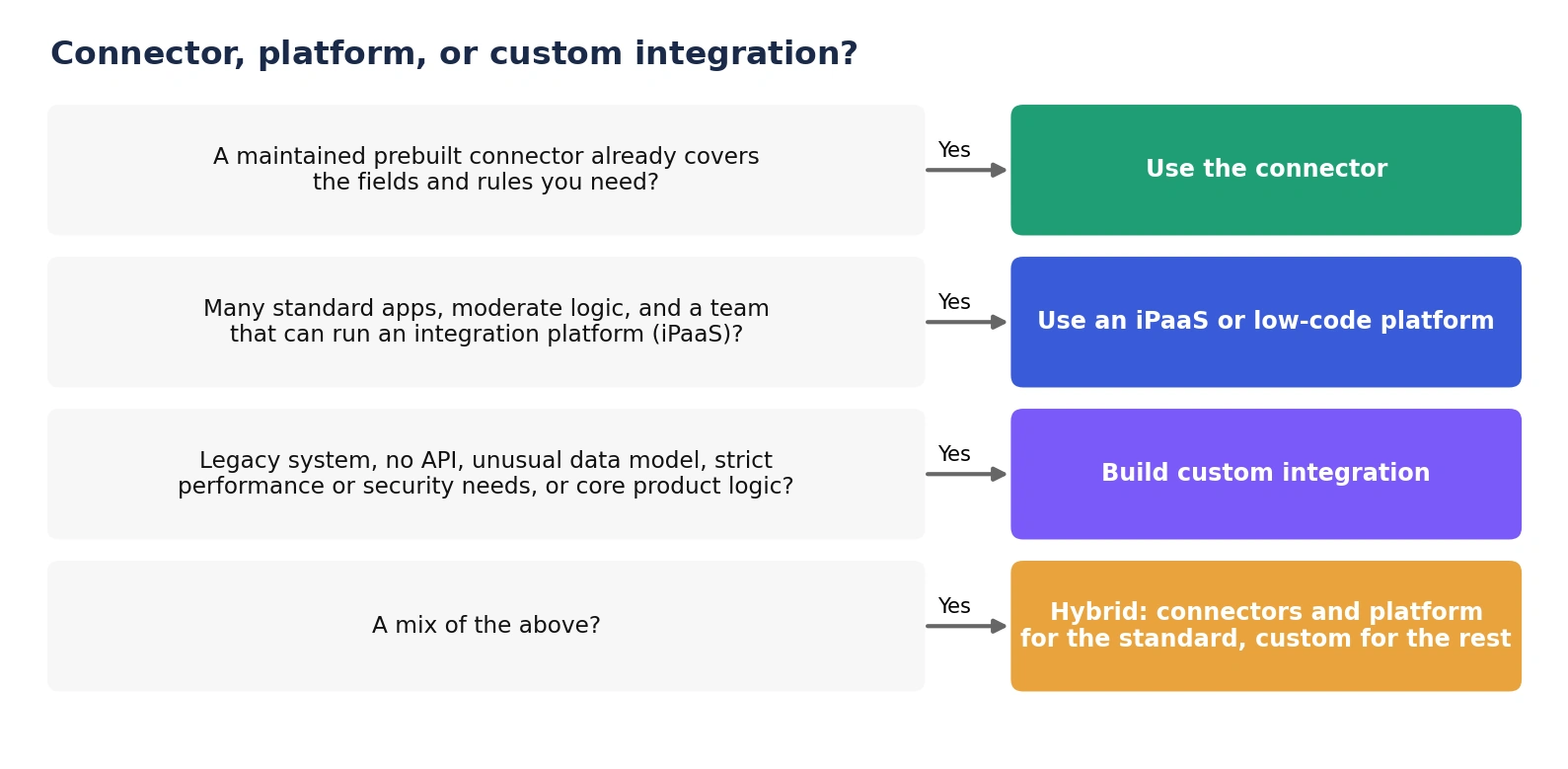
| Option | Best when | Watch out for |
| Prebuilt connector | Standard SaaS-to-SaaS flows using common fields and rules | Fixed field coverage; limited error handling; vendor changes can break it |
| Integration platform (iPaaS or low-code) | Many standard apps, moderate logic, and a team to run the platform | License cost that grows with volume; logic locked into the vendor’s tooling |
| Custom integration | Legacy systems, no usable API, unusual data models, strict performance or security needs, or integration that is core to your product | You own the build, testing, monitoring, and upgrades |
A common pattern is hybrid: connectors or a platform for the standard flows, and custom services for the few flows where the logic or the systems are unusual.
What Are the Main Integration Patterns?
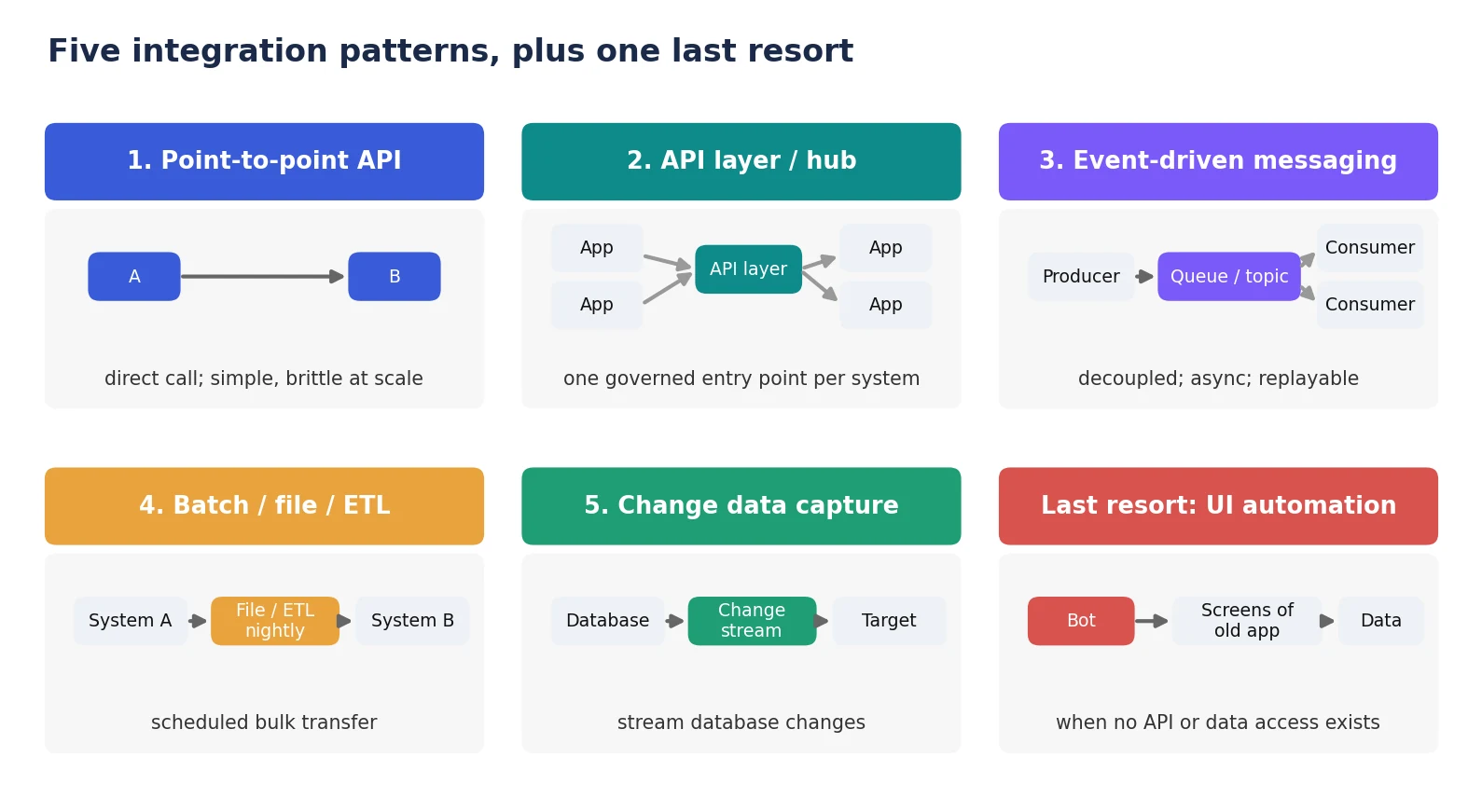
| Pattern | How it works | Best for | Watch out for |
| Point-to-point API | One system calls another directly | A few simple, stable connections | Connections multiply quickly and become hard to change |
| API layer or hub | Systems talk to a governed layer that routes, secures, and translates | Many consumers of the same data; central security and versioning | The layer becomes critical infrastructure and must scale |
| Event-driven messaging | Systems publish events to a queue or topic; others consume them | Decoupled, asynchronous flows; spikes in load; replay | Ordering, duplicates, and monitoring need deliberate design |
| Batch or file transfer | Scheduled bulk export and import | Large volumes where minutes or hours of delay are acceptable | Stale data between runs; failures found late |
| Change data capture | Stream changes from a database to other systems | Syncing data with no API; near-real-time replication | Needs database access and care with schema changes |
| UI automation (last resort) | A bot operates the old application’s screens | Systems with no API or data access at all | Breaks when screens change; slow; hard to audit |
Choose a pattern for each flow by asking how fast the data must move, how often it changes, how much it differs between systems, and what should happen if the receiver is down. A customer address change and a nightly sales report rarely need the same pattern.
How Do You Connect a Legacy System With No API?
Wrap the legacy system behind an adapter rather than letting every new system learn its quirks. Two patterns documented by Microsoft’s Azure Architecture Center cover most cases.
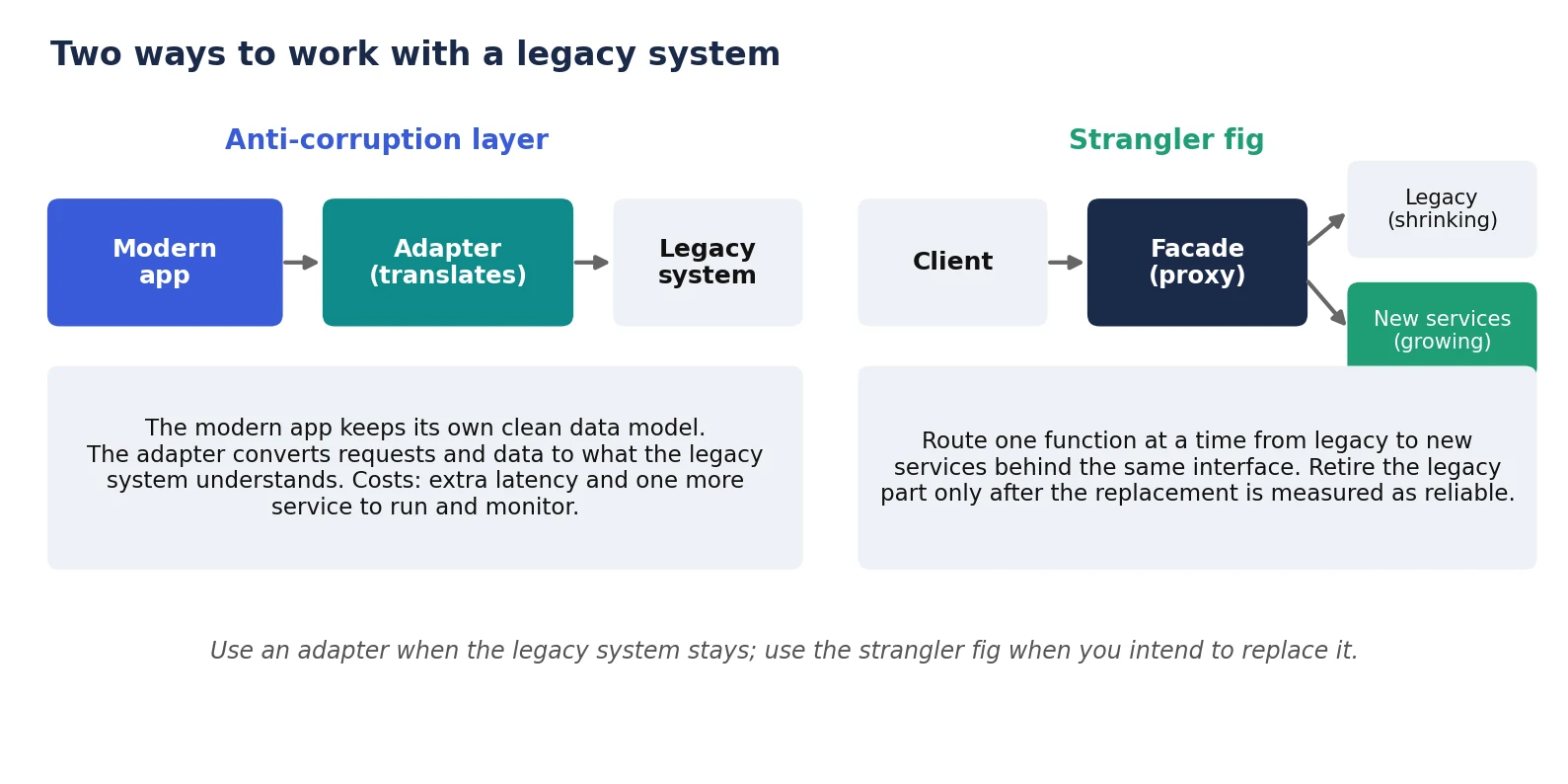 Anti-corruption layer: when the legacy system stays
Microsoft describes the anti-corruption layer as a façade or adapter between a modern application and a legacy system. Calls from the new system always use its own data model; the layer translates them into what the legacy system expects. This protects the new system’s design from legacy semantics. The same page warns about the costs: the layer can add latency, becomes another service to manage and maintain, and may not be worthwhile if the systems have no significant semantic differences.
Strangler fig: when you plan to replace it
The strangler fig pattern introduces a façade, or proxy, between the client and both the legacy and new systems. Functions move one at a time from the old system to new services behind the same interface, so consumers are unaware the migration is happening. After the migration, the façade is usually removed, or kept as an adapter for legacy clients. This is a controlled, phased alternative to a risky big-bang replacement.
Where there is truly no API and no database access, UI automation can connect the systems, but it is the most fragile option and should be treated as a bridge, not a destination.
How Do You Keep Data Consistent Between Systems?
Most integration bugs are data bugs. Before writing code, agree on the answers to these questions for every data entity that flows between systems:
| Decision | Question to answer | Example |
| System of record | Which system owns each entity and field? | The ERP owns invoices; the CRM owns contact details |
| Identifiers | How is the same customer matched across systems? | A shared customer ID, not a name or email match |
| Field mapping | How do formats, units, currencies, and statuses translate? | “Closed-won” in CRM maps to “Ready to invoice” in ERP |
| Conflict rules | What happens when both systems change the same record? | Last write wins, or the owning system wins |
| Deletions | Are deletes propagated, archived, or blocked? | Archive in the target; never hard delete automatically |
| Time | Which time zone and timestamp precision apply? | Store UTC; convert only for display |
Write these decisions down. They become the specification for both the integration and the tests.
How Do You Design an Integration That Fails Safely?
Every integration will eventually face an outage, a malformed message, or a slow response. Reliability comes from designing for those cases deliberately.
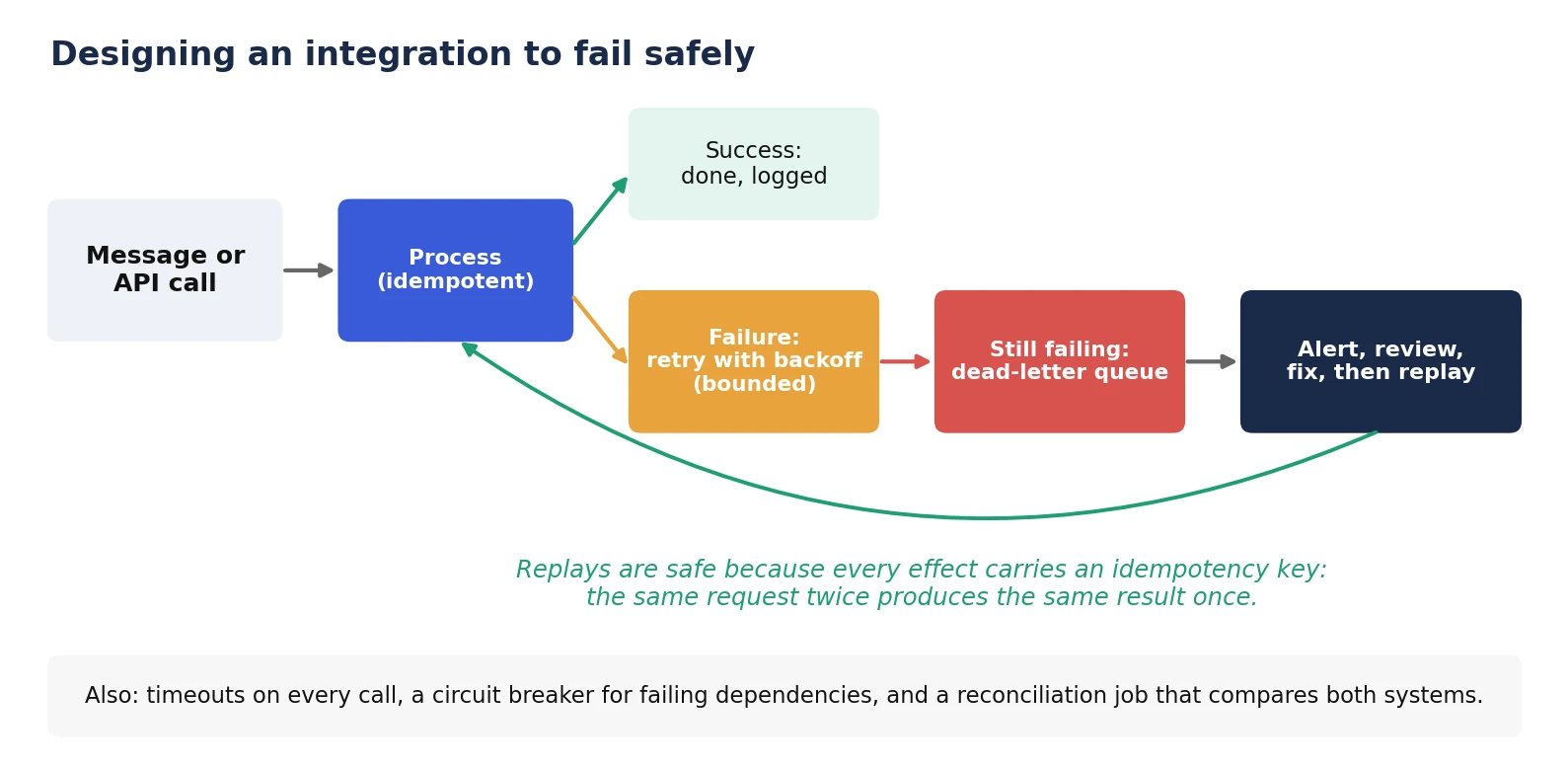
Bounded retries with backoff: retry transient failures a limited number of times, with growing delays, so a struggling system is not overwhelmed.
Idempotent operations: the Amazon Builders’ Library defines an idempotent operation as one that can be retried with no additional side effects, and describes using a unique, caller-provided client request identifier so a repeated request is recognized as a duplicate. Without this, a retry can create two invoices or two shipments.
Atomic recording of the key: the same article notes that recording the idempotency token and performing the associated changes should happen as one all-or-nothing operation, so you never record the token but fail to do the work, or the reverse.
Timeouts and circuit breakers: cap how long any call can wait, and stop calling a failing dependency for a while. Microsoft lists the Retry and Circuit Breaker patterns as supporting patterns for resilient service-to-service calls.
Dead-letter queues: messages that keep failing move aside for review instead of blocking everything behind them. Alert on the queue depth, fix the cause, then replay.
Reconciliation jobs: compare record counts and key fields between systems on a schedule to catch silent drift that no individual call reported.
How Do You Secure Integrations?
Integrations hold credentials to several systems and move sensitive data between them, which makes them attractive targets. The OWASP API Security Top 10 (2023) is a useful checklist. Its ranked list starts with broken object-level authorization, broken authentication, and broken object-property-level authorization, and also includes unrestricted resource consumption and unsafe consumption of APIs.
Authorize every call, not just the connection: object-level and property-level authorization failures let a caller read or change records they should not.
Use least-privilege service accounts: each integration gets only the permissions its flows need, with credentials in a secrets manager and rotated regularly.
Validate what partners send you: OWASP’s API10:2023 (Unsafe Consumption of APIs) warns that developers often trust third-party API responses more than user input. Treat inbound data from other systems as untrusted input.
Limit resource consumption: rate limits, payload size limits, and quotas stop a faulty or hostile caller from exhausting a system.
Keep an inventory: know which integrations exist, who owns them, and which endpoints are exposed. Forgotten, undocumented endpoints are a known weakness (OWASP API9:2023, Improper Inventory Management).
Log sensitive actions: keep audit logs of data access and changes across the integration.
How Do You Test and Monitor Integrations?
An integration that passes testing on clean sample data can still fail on real data. Test and monitor the messy parts.
Contract tests: check that each side still honors the agreed request and response formats, so an upstream change is caught before production.
Edge-case and failure tests: duplicates, missing fields, out-of-order events, very large payloads, slow responses, and outages.
Non-production environments: run against sandboxes or mocks, never real customer systems, until the flow is proven.
Monitoring: track throughput, error rate, processing lag, dead-letter depth, and reconciliation differences, with alerts that reach a named owner. Tracing each request across systems, for example with standards such as OpenTelemetry, makes failures far quicker to diagnose.
Runbooks: document what to do when each alert fires, including how to replay failed messages safely.
What Drives the Cost of Custom Integration?
Integration cost depends far more on what the systems are like than on how many boxes appear on a diagram. The main system-related drivers are:
Number of systems and flows: each flow needs mapping, building, testing, and monitoring.
Quality of the interfaces: a well-documented, stable API is cheap to connect; an undocumented legacy system is not.
Data quality and mapping complexity: duplicates, inconsistent formats, and missing identifiers add work.
Volume and latency needs: real-time, high-volume flows need more engineering than nightly batches.
Security and compliance: authentication, encryption, audit logs, and regulatory obligations.
Rate of change: systems that change often need more contract tests and maintenance.
Team location and seniority are a separate price factor. Accelerance’s 2026 rates guide, based on a survey of 60 development partners, puts senior developer rates at about $31 to $41 an hour in Asia, $60 to $75 in Latin America, and $64 to $76 in Europe.
Ask any provider for an estimate that separates these drivers and states what is included for testing, monitoring, and support after launch.
Get a Custom Project Cost & Timeline Estimate ->
How Do You Run a Custom Integration Project?
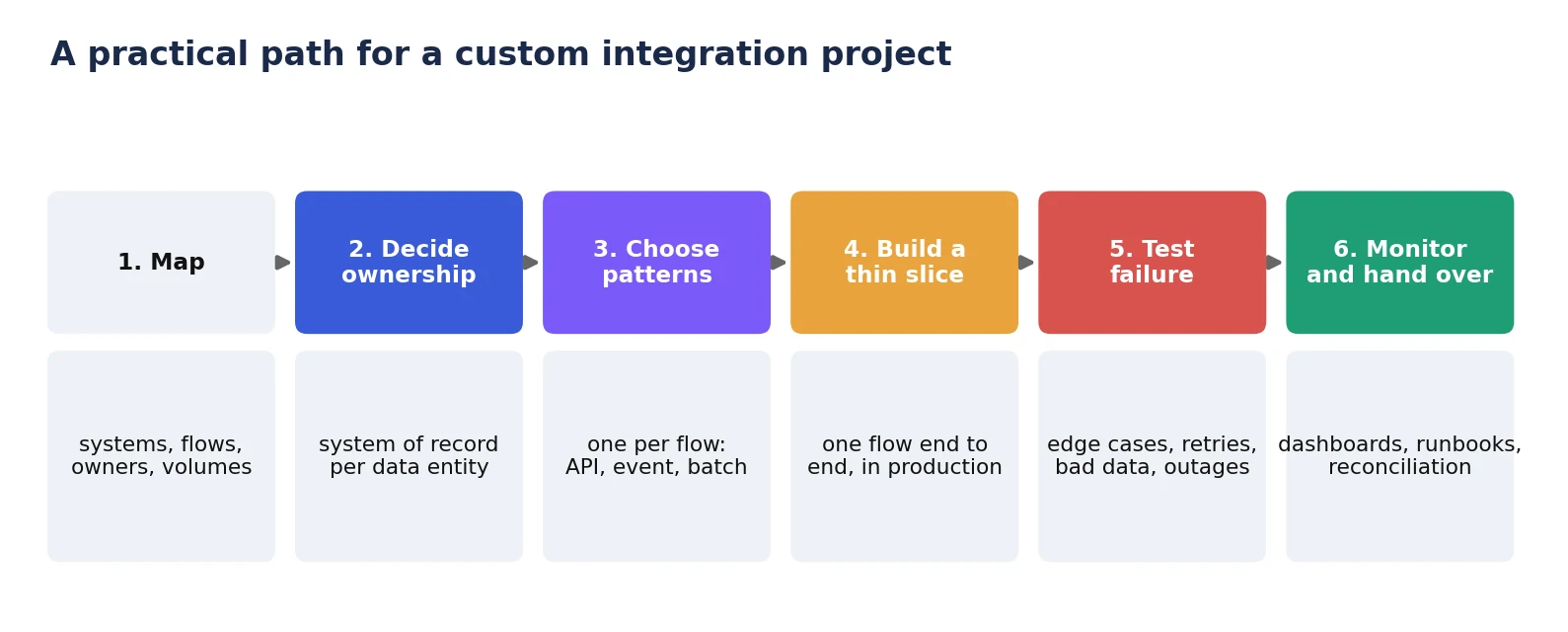
- Map: list the systems, data flows, owners, volumes, and known pain points.
- Decide ownership: name the system of record and the matching rules for each entity.
- Choose patterns: select a pattern per flow based on speed, volume, and failure tolerance.
- Build a thin slice: deliver one flow end to end in production before building the rest.
- Test failure: exercise retries, bad data and outages deliberately.
- Monitor and hand over: ship dashboards, alerts, runbooks, and reconciliation, and make sure your team owns the code and accounts.
What Should You Ask an Integration Partner?
Which pattern will you use for each flow, and why?
How will you handle retries, duplicates, and failed messages?
Which system will be the system of record for each data entity?
How will credentials be stored, scoped, and rotated?
What monitoring, alerts, and runbooks do we receive at handover?
Will the code, accounts, and documentation sit in our name from day one?
How do you test against real-world bad data without touching live systems?
How AB Ark Approaches Custom Software Integration
AB Ark builds custom software and AI agents that work with clients’ existing systems. Projects start by mapping systems and data flows, then deliver one working flow at a time with failure handling, monitoring, and documentation. AB Ark’s case studies include a 24/7 AI call agent that manages bookings across multiple branches, an example of software that must work reliably with the business systems around it. Teams planning an integration, or an AI agent that needs data from several systems, can start with AB Ark’s AI agent development service or get in touch.
FAQs
What is custom software integration?
Building the code, services, and data pipelines that connect separate systems so they exchange data and trigger actions in each other, when a prebuilt connector or platform does not cover your systems or logic.
When should I choose custom integration over an integration platform?
When you have legacy systems or no usable API, unusual data models, strict performance or security needs, or integration logic that is core to your product. Use connectors or a platform for standard flows and custom code for the rest.
What is the best integration pattern?
There is no single best pattern. Use API calls for real-time requests, event-driven messaging for decoupled flows, batch transfers for bulk data, and change data capture for syncing databases. Choose per flow.
How do you integrate a legacy system that has no API?
Wrap it in an adapter, known as an anti-corruption layer, or, if you have database access, expose its data through change data capture (CDC). If neither an API nor database access exists, UI automation is a last resort. If you plan to replace it, route functions gradually to new services behind a façade using the strangler fig pattern.
How do you stop integrations from breaking?
Use contract tests, idempotent operations, bounded retries, dead-letter queues, monitoring with alerts, and reconciliation jobs, and assign a named owner to every integration.
Integrate with a clear purpose for each flow, protect your new systems from legacy quirks, and design every connection to fail safely. Connections that are tested, monitored, and owned keep working long after launch.
Schedule a Free Consultation Call ->
Engineering Manager At AB Ark Solutions