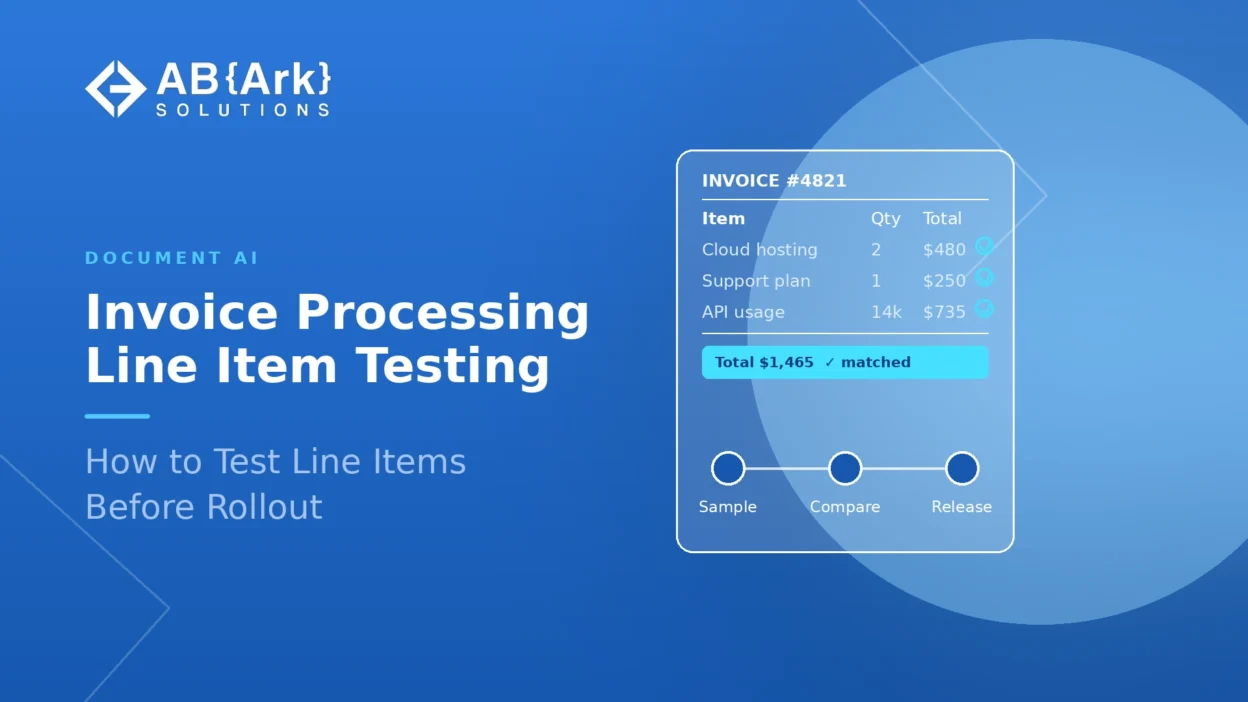

In Document AI invoice processing, line items should be tested at five levels before rollout: field capture, row integrity, arithmetic checks, purchase order (PO) matching and posting readiness. Header fields such as vendor and total are the easy part; line tables break in ways a header-level accuracy score hides. Test against a labeled set of your own invoices, then roll out in shadow mode with confidence thresholds and human review.
Key Takeaways
- A single “extraction accuracy” figure is not enough for invoices; measure line items separately at field, row and invoice level.
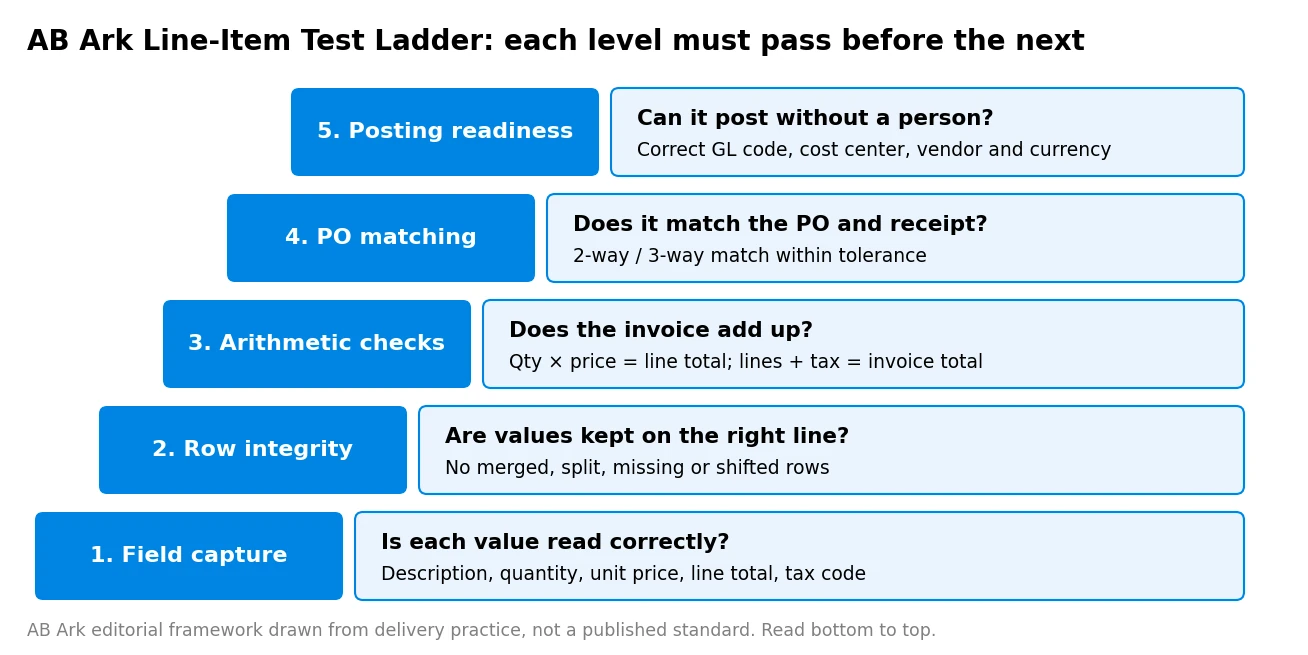
- The AB Ark Line-Item Test Ladder checks five levels in order: field capture, row integrity, arithmetic checks, PO matching and posting readiness.
- Build the test set from your own invoices, stratified by vendor, layout, scan quality, language, page count and document type such as credit notes.
- Exceptions are the cost driver: Ardent Partners’ 2025 research, as summarized by Tungsten Automation, puts average invoice exception rates at 14% against 9% for best-in-class teams.
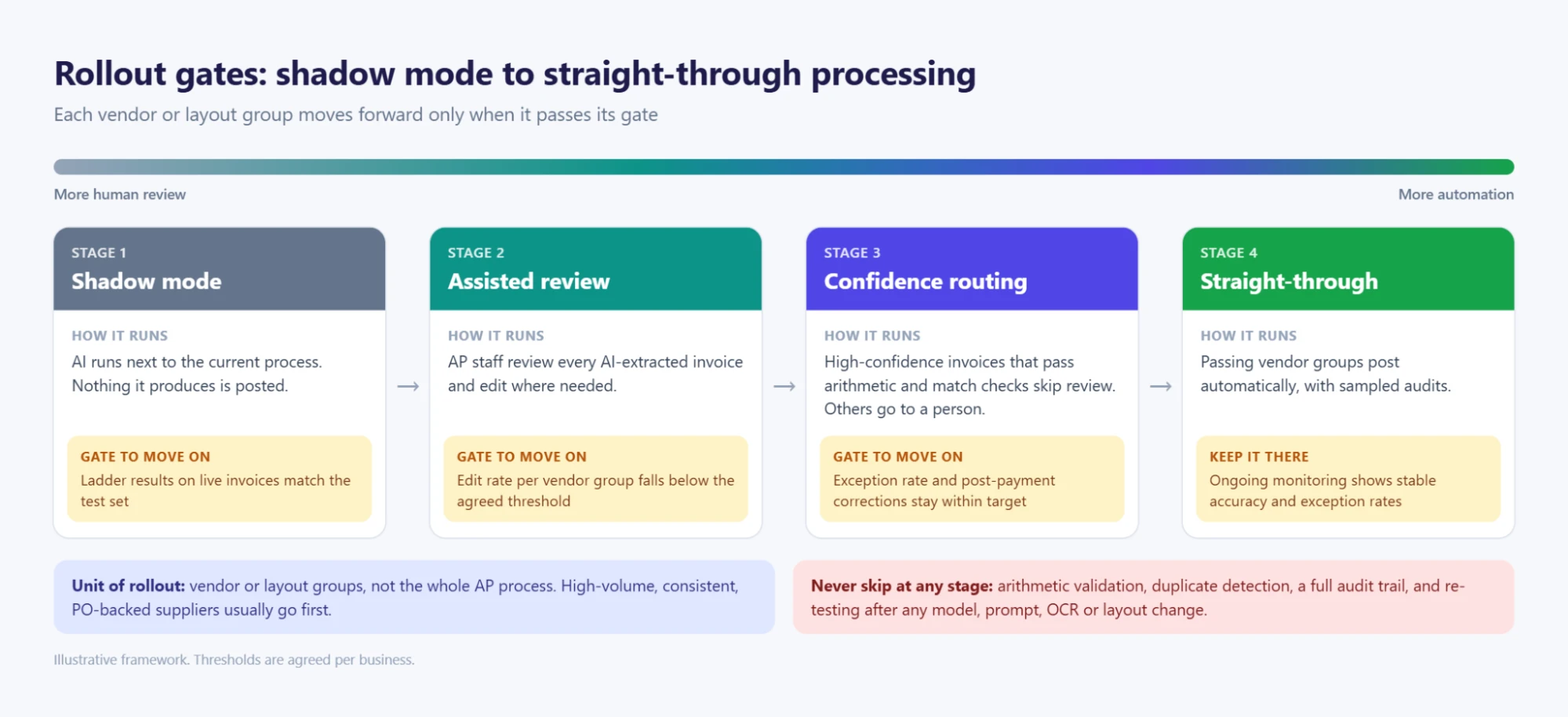
- Roll out in stages: shadow mode, assisted review, then straight-through (touchless) processing only for vendor and layout groups that pass agreed thresholds.
Talk to Our Team About Your Project →
What Is Document AI Invoice Processing?
Document AI invoice processing is the use of optical character recognition (OCR), layout models and large language models (LLMs) to read supplier invoices and turn them into structured data for accounts payable (AP). It covers header fields such as vendor, invoice number, date, currency and totals, and line items such as description, quantity, unit price, tax and line total.
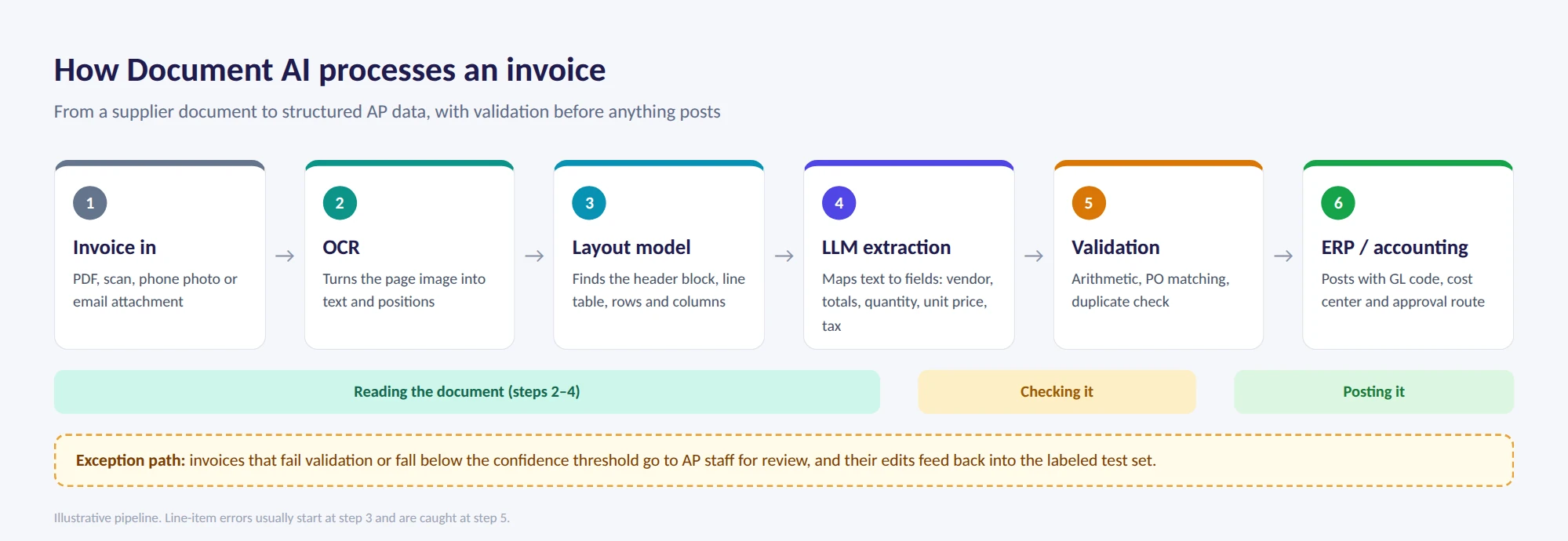
Includes: capture from PDFs, scans, photos and email attachments; line-table extraction; validation; and handoff to an ERP or accounting system. Excludes: structured e-invoices that already arrive as machine-readable data, and payment execution. Common misconception: that a high overall accuracy score means invoices are ready to post. An invoice can have every header field right and still carry a shifted line row that breaks PO matching.
Why Line-Item Testing Matters Before Rollout
Line-item testing matters because line-level errors are what turn an automated invoice into an exception, and exceptions are where AP cost sits. A header-only test can pass while the line table quietly fails on multi-page invoices, merged cells or discount rows.
According to Ardent Partners’ AP Metrics That Matter in 2025 report, as summarized by Tungsten Automation in April 2025, invoice exception rates average 14%, against 9% for best-in-class organizations, and the average cost to process a single invoice is $9.40 against $2.78 for best-in-class teams. The same summary reports that 53% of AP leaders named high exception rates as a significant hurdle.
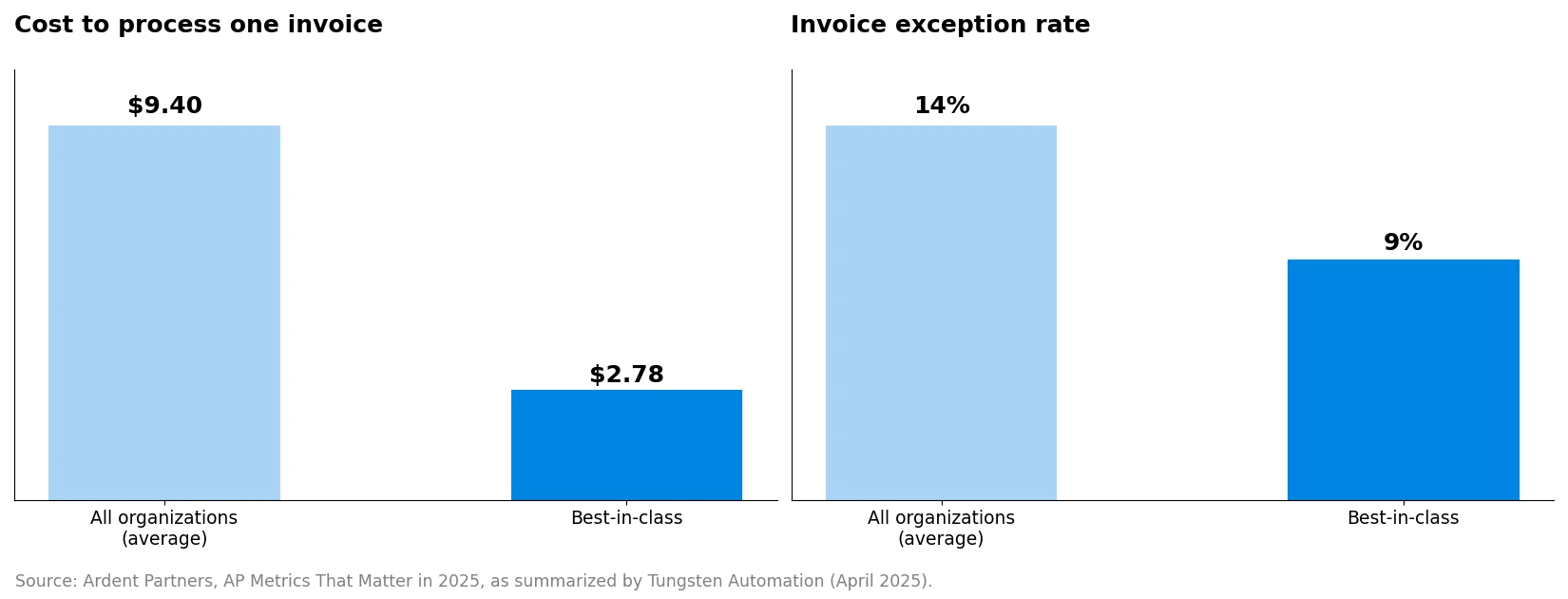
Implication: a Document AI rollout should be judged on how many invoices it moves through without an exception, not on how many characters it reads correctly. That is a line-item problem first.
Where line items usually break:
| Line-item failure | Why it happens | What it causes downstream |
|---|---|---|
| Shifted or merged rows | Wrapped descriptions, merged cells, tight row spacing | Wrong quantity or price attached to a line; PO matching fails |
| Missing rows on page 2+ | Tables that continue across pages or repeat headers | Line totals no longer add up to the invoice total |
| Discount, freight and fee lines misread | Non-product rows formatted differently | Overstated or understated totals; wrong GL coding |
| Tax at line vs invoice level confused | Mixed tax presentation across vendors | Tax reconciliation errors |
| Quantity and unit swapped | Columns in unusual order, units inside descriptions | Incorrect receipt matching |
| Credit notes treated as invoices | Negative values or “credit” labels missed | Wrong payment direction |
How to Test Line Items: The AB Ark Line-Item Test Ladder
The AB Ark Line-Item Test Ladder tests Document AI invoice output at five levels, each of which must pass before the next is meaningful. It is an AB Ark editorial framework drawn from delivery practice rather than a published standard.
| Level | What is tested | How to measure it |
|---|---|---|
| 1. Field capture | Each line value is read correctly: description, quantity, unit price, line total, tax code | Field-level accuracy per column against labeled values |
| 2. Row integrity | Values stay on the correct row; no rows are merged, split, missed or invented | Row recall (labeled rows found) and row precision (extracted rows that are real) |
| 3. Arithmetic checks | Quantity × unit price = line total; lines + tax + charges = invoice total | Share of invoices that reconcile within a rounding tolerance |
| 4. PO matching | Lines match the PO and goods receipt within tolerance | 2-way or 3-way match pass rate on PO-backed invoices |
| 5. Posting readiness | Correct GL code, cost center, vendor, currency and approval route | Share of invoices that could post with no human edit |
Levels 1 and 2 test the model. Levels 3 to 5 test the whole pipeline, including validation rules and ERP data. A model with strong field accuracy can still fail level 2 on a vendor whose tables wrap, which is why row integrity is scored separately.
Build a test set from your own invoices
A useful line-item test set is a labeled sample of real invoices, stratified so every common pattern is represented. Vendor demo documents are not a substitute.
- Vendors: your highest-volume suppliers, plus a sample of long-tail suppliers.
- Layouts: single-page, multi-page, tables continuing across pages, and invoices with free-text descriptions.
- Quality: native PDFs, scans, phone photos and faxes if you still receive them.
- Document types: PO-backed invoices, non-PO invoices, credit notes and invoices with discounts, freight or fees.
- Languages and currencies: every language, currency and tax regime you process.
Label each line by hand, with the correct value for every column, and keep the labeled set fixed so results can be re-scored on the same documents after any vendor, model or prompt change.
Worked example (illustrative)
A distributor processes invoices from 400 suppliers. Its test set includes the top 40 suppliers by volume and a random sample of 60 smaller ones, covering native PDFs, scans and multi-page invoices. On the first run, field capture looks strong, but row integrity fails on three high-volume suppliers whose product descriptions wrap onto two lines, creating phantom rows with no price. Arithmetic checks catch the problem because line totals no longer match the invoice total. The team adds a row-merging rule for wrapped descriptions, re-scores the same labeled set, and keeps those three suppliers in assisted review until they pass. Straight-through processing starts with the suppliers that passed all five levels.
Get a Custom Project Cost & Timeline Estimate →
Rollout Gates: From Shadow Mode to Touchless Invoice Processing
Rollout should move invoice groups, not the whole AP process, from one stage to the next. Each vendor or layout group earns straight-through (touchless) invoice processing only when it passes agreed thresholds on the test ladder.
| Stage | How it runs | Gate to move on |
|---|---|---|
| Shadow mode | Document AI runs alongside the current process; nothing it produces is posted | Ladder results on live invoices match the test set |
| Assisted review | AP staff review every AI-extracted invoice, editing where needed | Edit rate per vendor group falls below the agreed threshold |
| Confidence-based routing | High-confidence invoices that pass arithmetic and match checks skip review; others go to a person | Exception rate and post-payment corrections stay within target |
| Straight-through (touchless) processing | Passing vendor groups post automatically, with sampled audits | Ongoing monitoring shows stable accuracy and exception rates |
Usually safe to automate first: high-volume suppliers with consistent layouts and PO-backed invoices that pass 3-way matching.
Usually kept in review longer: non-PO invoices, credit notes, new suppliers, poor-quality scans and invoices above a value threshold.
Never skip:
- Arithmetic validation: every invoice should reconcile line totals to the invoice total before it can post.
- Duplicate detection: check invoice number, vendor and amount against past invoices before payment.
- Audit trail: keep the source document, extracted values, confidence scores and any human edits for each invoice.
- Re-testing after any change: re-score the labeled set whenever the model, prompt, OCR engine or a major vendor layout changes.
Choosing a Document AI Approach for Invoice Line Items
Most teams choose between a packaged invoice-capture product, a cloud Document AI service configured for invoices, or a custom pipeline that combines OCR, layout models and an LLM. The right choice depends on invoice variety, volume and how tightly line items must match ERP data.
| Approach | Better when | Main trade-off |
|---|---|---|
| Packaged AP capture product | Invoice formats are common and the AP team wants a finished workflow | Limited control over edge cases and validation rules |
| Cloud Document AI service | Volumes are high and an in-house team can build validation and ERP integration | Line-table quality varies by layout; validation is your job |
| Custom OCR + layout + LLM pipeline | Invoices are highly varied, multilingual or domain-specific | More engineering, evaluation and maintenance |
Whichever approach you choose, the test ladder stays the same. It measures the output, not the vendor’s claims, so it can compare options on your own invoices.
An AB Ark Implementation Lens
AB Ark’s All-in-One Business Platform case study shows why invoice data quality depends on the system it lands in. The client was running operations across disconnected tools for tasks, communication, data and workflows, and an AB Ark team consolidated them into one platform covering accounting, task management and team collaboration. For Document AI invoice processing, that matters at levels 4 and 5 of the test ladder: PO matching and posting readiness only work when vendor, PO and GL data live in one consistent place. The case study is not a Document AI project, and it does not publish extraction results.
Implementation: Preparing for a Document AI Invoice Rollout
A Document AI invoice rollout needs an AP process owner, a labeled test set, clean master data and agreed thresholds before any automation goes live.
- Prerequisites: a current vendor master, accessible PO and goods-receipt data, a defined GL coding scheme and a sample of recent invoices for labeling.
- Team: an AP lead who owns thresholds and exceptions, an engineer for extraction and validation rules, an ERP or integration specialist, and AP staff who label the test set and run assisted review. If you need extra capacity, AB Ark’s vetted AI engineers can join through staff augmentation.
- Timeline variables: the number of vendors and layouts, scan quality, labeling effort, ERP integration and how many vendor groups need assisted review.
- Success metrics: row-level recall and precision, arithmetic reconciliation rate, PO match rate, exception rate, straight-through processing rate, cost per invoice and post-payment corrections.
If your extraction uses retrieval to look up vendors, POs or policies, AB Ark’s guide to why RAG systems fail in production covers the retrieval issues that often appear after go-live.
FAQs
How accurate is Document AI for invoice line items?
Accuracy depends heavily on invoice layout, scan quality and language, so vendor-reported figures rarely transfer to your documents. Measure it yourself on a labeled set of your own invoices, scoring field accuracy, row recall and precision, and arithmetic reconciliation separately rather than relying on one overall number.
How many invoices do I need to test Document AI?
There is no fixed number. The test set should cover every high-volume supplier, a sample of long-tail suppliers and every layout, language and document type you process. Coverage of patterns matters more than raw count, and the set should stay fixed so results are comparable across changes.
What is the difference between header and line-item extraction?
Header extraction captures invoice-level fields such as vendor, invoice number, date and total. Line-item extraction captures the table of products or services, with quantity, unit price, tax and line total for each row. Line items are harder because tables vary in structure and can span pages.
Can Document AI handle multi-page and scanned invoices?
Yes, but these are the most common sources of line-item errors. Include them deliberately in the test set, check row integrity across page breaks, and keep poor-quality scans in assisted review until they pass the same thresholds as clean PDFs.
When can invoices go straight through without review?
When a vendor or layout group passes all five levels of the test ladder on live invoices in shadow mode, and its exception and correction rates stay within target during assisted review. Even then, keep sampled audits and re-test whenever the model or vendor layout changes.
The Rule for Document AI Invoice Processing
Test line items, not just headers. Score field capture, row integrity, arithmetic, PO matching and posting readiness on a labeled set of your own invoices, then roll out vendor group by vendor group through shadow mode and assisted review. Never skip arithmetic validation, duplicate detection, audit trails or re-testing after any change.
A Document AI rollout is not ready when it reads invoices well. It is ready when its line items add up, match and post without a person fixing them.
Schedule a Free Consultation Call →
Engineering Manager At AB Ark Solutions