
AI agent approval is the point in a workflow where a person must review and sign off on an action an AI agent proposes before it runs. A human should sign off when an action is high-impact and hard to reverse: moving money, deleting or changing records of truth, sending messages to customers or the public, deploying code to production, or granting access. Low-impact, easily reversed actions can run automatically, with limits and logging enforced in code. In custom AI agent development, these rules are set per action, so each agent asks for approval only where the risk justifies it.
This guide covers approval for action-taking AI agents: agents that use tools to change things in business systems, such as issuing refunds, updating records or deploying code. It does not cover chatbots that only answer questions. Agents vary in how much freedom they have, from an assistant that proposes a single action, to a workflow agent that follows fixed steps, to an autonomous agent that chooses its own tools across many steps. The more autonomy an agent has, the more approval points it needs. The rules below are set by the action an agent takes rather than by the agent’s label, so they apply to all three.
Key Takeaways
- Decide sign-off with two questions: how much harm could this action cause if it is wrong, and how easily can it be undone?
- Approval rules belong in code the agent cannot bypass, not in the agent’s prompt.
- An approval is only useful if the reviewer can judge it: show the proposed action, the evidence, the policy and what changes if they approve.
- Too many approvals cause rubber-stamping. Automate the safe actions so people can focus on the risky ones.
- Unanswered approvals must expire, never execute by default; most frameworks will wait indefinitely unless you add a timeout.
Talk to Our Team About Your Project ->
What Is AI Agent Approval?
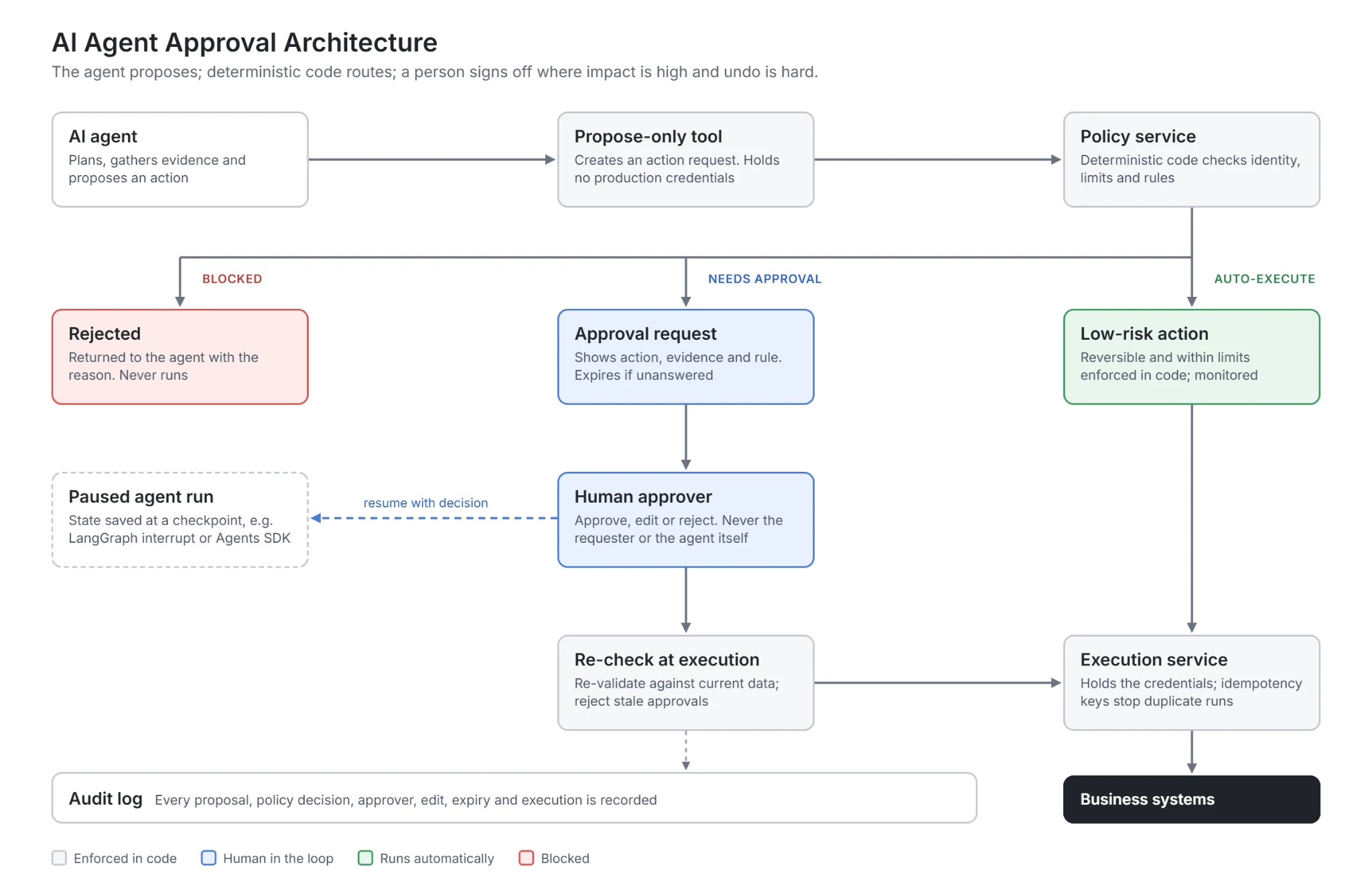
AI agent approval is a control that separates what an AI agent decides from what a business system actually does. The agent plans and proposes an action, such as “refund this order”, “send this email” or “deploy this change”. An approval workflow pauses that action, shows it to a person with authority, and only executes it if they approve. The agent recommends; a person, or a rule written in code, decides.
Approval is one of three common levels of human oversight, and most production agents use all three for different actions. The three levels are an editorial framework rather than legal terms. For high-risk systems, Article 14 of the EU AI Act sets the legal oversight requirement, and OWASP LLM06:2025 lists human approval of high-impact actions as a mitigation for excessive autonomy. The table shows how each level works and where it fits:
| Oversight mode | How it works | Best for | |
|---|---|---|---|
| Human-in-the-loop (approval) | A person must approve before the action runs | High-impact, hard-to-reverse actions: payments, deletions, production changes, access grants | |
| Human-on-the-loop (supervision) | The action runs automatically; people monitor and can intervene or roll back | High-volume actions that are easy to reverse, such as updating records or routing work | |
| Automated with audit | The action runs within limits enforced in code and is logged for later review | Low-impact actions: reading data, tagging, drafting content for later review |
Approval is not the same as guardrails. Guardrails are automatic checks that block inputs, outputs or tool calls that break a known rule. Approval puts a person in the path for decisions that need judgment. A well-designed agent uses guardrails to clear routine cases at machine speed and approval for the cases that genuinely need a human.
Why AI Agents Need Approval Points
AI agents are useful because they can take actions, and risky for the same reason. The OWASP Top 10 for LLM Applications names Excessive Agency (LLM06:2025) as the vulnerability that allows damaging actions in response to unexpected, ambiguous or manipulated model outputs, and traces it to three root causes: excessive functionality, excessive permissions and excessive autonomy. Requiring human approval for high-impact actions is one of OWASP’s recommended mitigations for the third.
Weak controls also kill projects. Gartner predicts that over 40% of agentic AI projects will be canceled by the end of 2027, citing escalating costs, unclear business value or inadequate risk controls (press release, June 2025). Approval design is one of the most visible risk controls a team can show to security reviewers, auditors and customers.
Regulation points the same way for high-risk uses. Article 14 of the EU AI Act requires high-risk AI systems to be designed so they can be effectively overseen by natural persons while in use, with oversight measures proportionate to the risks, level of autonomy and context. The article explicitly asks that overseers stay aware of automation bias, the tendency to over-rely on AI output. Under the 2026 Digital Omnibus, these high-risk obligations apply from 2 December 2027 for Annex III systems.
Automation bias is the catch. Research on Article 14 notes that human oversight has significant limitations, including cognitive constraints and automation bias, so it should not be relied on as a standalone safeguard. An approval step only works if it is designed for the person doing the approving.
What Are Checkpoints in AI Agents?
A checkpoint is a defined point in an agent’s run where execution is saved, paused or validated before it continues. Approval is one kind of checkpoint, but not the only one.
Checkpoints sit between the agent proposing an action and the system carrying it out. At each one, the workflow can save the run’s state, check the action against limits and policy, route it to a person if needed, and then resume, change or cancel the run based on the result. Because the state is saved, a run can wait for a reviewer without losing its place. In LangGraph, for example, an interrupt pauses the graph and saves its state through a checkpointer so a person can respond later.
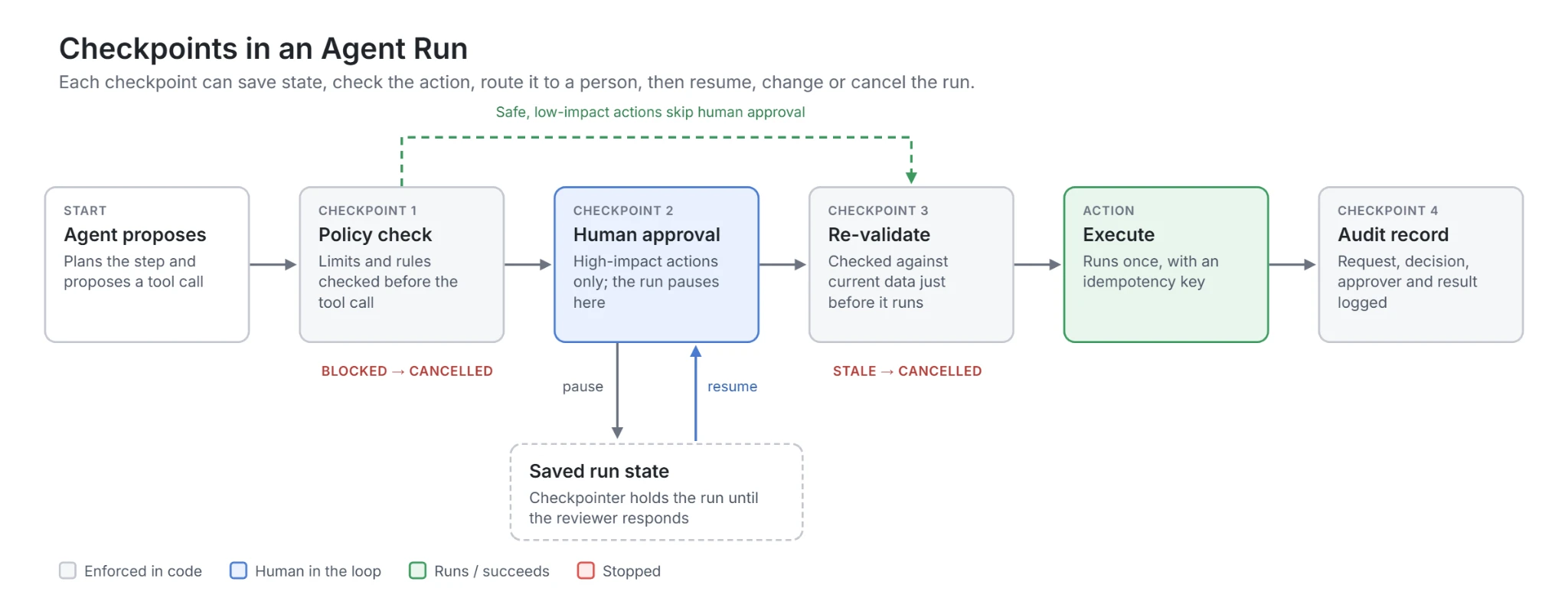
Common checkpoint types include limit and policy checks before a tool call, human approval for high-impact actions, re-validation immediately before execution, and an audit record after it. Placing them deliberately is what lets an agent run automatically on safe actions and stop only where a person is needed.
When Should a Human Sign Off? Impact Against Reversibility
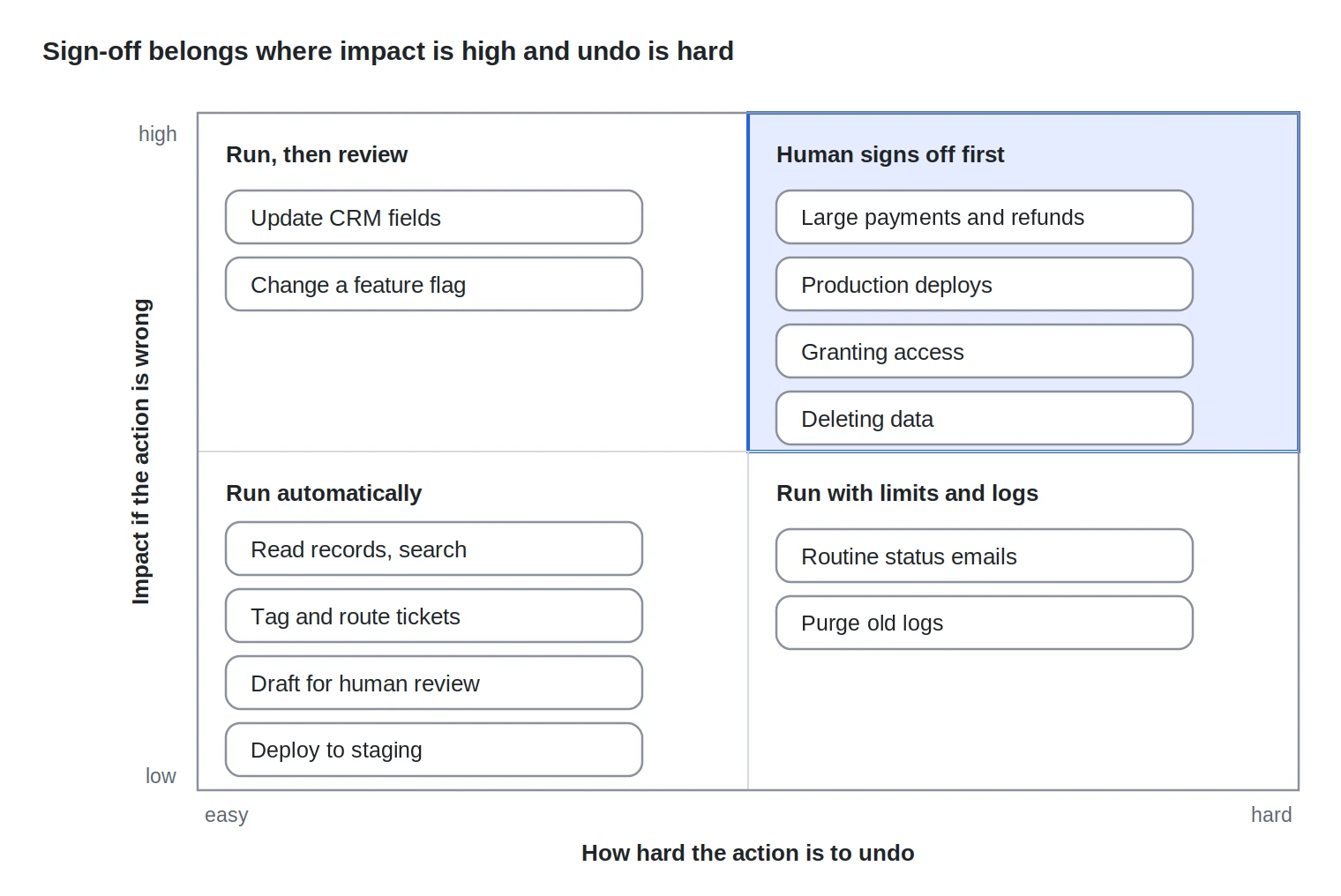
Two questions decide whether an AI agent’s action needs human sign-off: how much harm could it cause if it is wrong, and how hard is it to undo? Actions that are both high-impact and hard to reverse need approval before they run. Everything else can run automatically, with the level of monitoring rising as impact grows.
The example actions are placed by AB Ark’s editorial judgement, not measured data, and the same action can move between quadrants. A $5 credit is low-impact; a $5,000 refund is not. Deploying to a staging environment is easy to undo; deploying a database migration to production may not be. Map your own agent’s tools rather than copying the examples.
Three conditions should move any action into the sign-off quadrant regardless of where it would otherwise sit: the agent is acting on untrusted input, such as an email or document that could contain instructions; the action affects a person’s rights, money or access; or the agent is operating outside its normal pattern, for example an unusual amount, recipient or time.
Approval Rules by Action Type
The table below sets a default approval rule for the action types AI agents most commonly perform. It is AB Ark editorial guidance; your thresholds will depend on your risk appetite, volumes and regulation.
| Action type | Examples | Default rule | Who approves | What the approver must see |
|---|---|---|---|---|
| Read data | Search records, look up an order, retrieve documents | No approval; access limited to what the user is allowed to see | Not applicable | Logged for audit |
| Draft content | Draft a reply, summary or report for a person to send | No approval; a person sends it | The sender | The draft and its sources |
| Customer or external messages | Send emails, chat replies, social posts | Auto-send for templated, low-risk messages; approval for anything novel, sensitive or public | Team lead or owner of the channel | Full message, recipient, context, policy it relies on |
| Money movement | Refunds, credits, payouts, payments | Auto below a cap with rules checked in code; approval above it | Finance or a lead with authority for that amount | Amount, recipient, evidence, policy clause, account history |
| Changes to records of truth | Update CRM, ERP, billing or HR records | Auto for low-risk fields with audit; approval for financial, legal or bulk changes | Record owner | Before and after values, number of records affected |
| Deletion | Delete files, records or accounts | Approval, plus a soft-delete or recovery window | Data owner | What will be deleted, backups, recovery path |
| Code and infrastructure | Merge code, run migrations, deploy, change configuration | Auto to test environments; approval for production | Engineering owner on call | Diff, tests run, rollback plan, blast radius |
| Access and permissions | Grant roles, share files, create API keys | Approval, with separation of duties | Security or system owner | Who gets what access, for how long, and why |
| Commitments | Purchases, bookings, contract terms | Approval above a set value | Budget holder | Vendor, amount, terms, cancellation options |
For a worked example of the money-movement row, AB Ark’s AI agent approval workflow for refunds sets out the seven-gate pre-refund checklist that should pass before an AI agent issues a refund, and the auto-approve, human review and block tiers.
Get a Custom Project Cost & Timeline Estimate ->
Designing Approvals People Can Actually Review
The most common way an approval workflow fails is not a missing approval step but a meaningless one. When reviewers face a stream of requests with little context, they approve by habit, and the control exists only on paper. Good approval design reduces how many requests reach people and makes each one easy to judge.
What every approval request should show
| Field | Why it matters |
|---|---|
| The proposed action, in plain language | The reviewer must know exactly what will happen, not infer it from a tool call |
| The parameters | Amount, recipient, records, environment or permissions, shown explicitly |
| The evidence the agent used | Source records, documents or messages, so the reviewer can check the reasoning |
| The rule or policy that triggered review | Why this request needs a person, for example “above the auto-approval cap” |
| What changes and whether it can be undone | Before and after, blast radius, rollback or recovery path |
| Who asked, and on whose behalf | The user or system that started the agent run |
| An expiry time | When the request lapses if nobody acts |
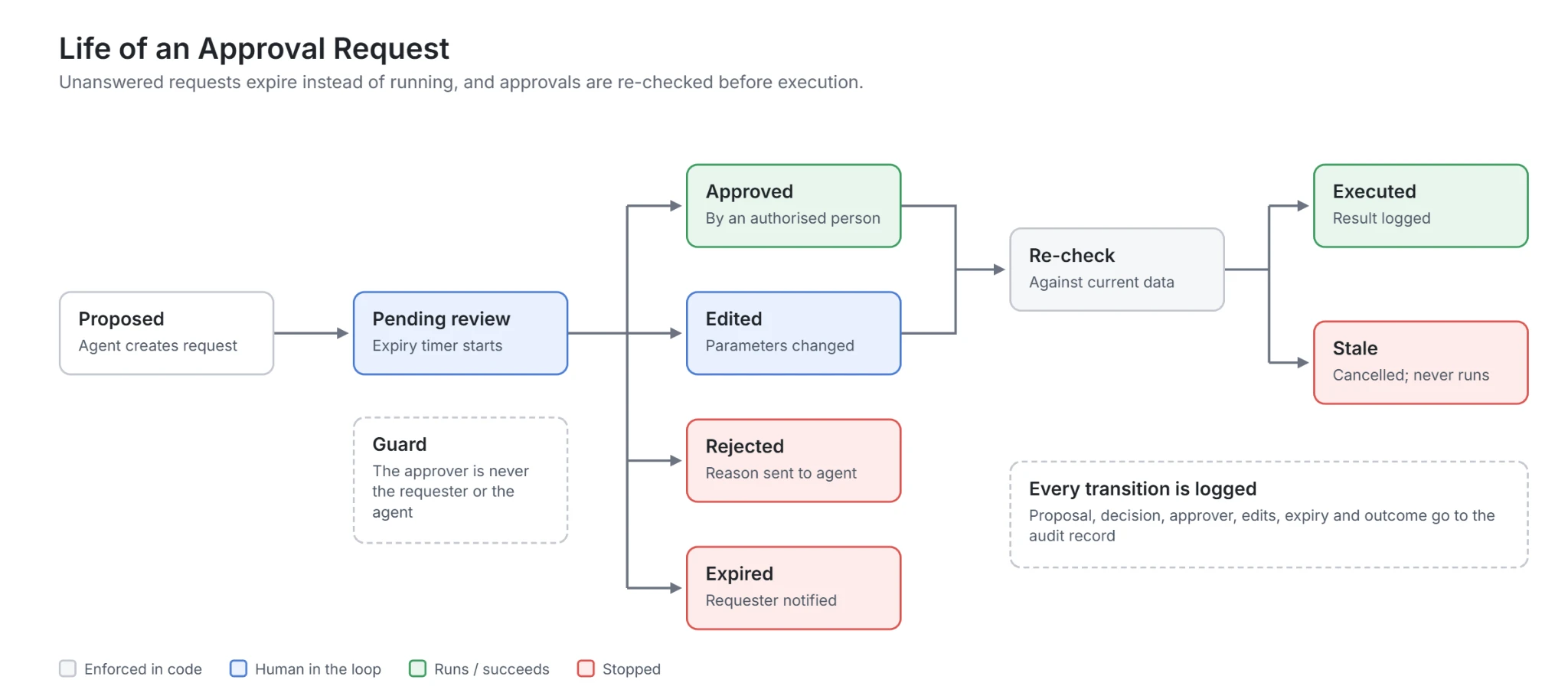
Rules that keep approvals meaningful
- 1. Approve fewer things: Move clearly safe actions to automatic execution with limits, so reviewers see only cases that need judgment. A high approval volume is a design smell, not a safety feature.
- 2. Expire, never default to yes: An unanswered request must lapse and notify the requester. LangGraph’s documentation notes that an interrupt waits indefinitely until execution is resumed, so expiry is something your workflow has to add.
- 3. Separate duties: The person who asked the agent to act should not be the only approver of a high-impact action that benefits them, and agents should never approve their own requests. If an agent can approve its own request, the approval step is meaningless: a prompt-injected or faulty agent could propose and approve a harmful action in the same run. Enforce this in code: the approval endpoint accepts only authenticated human identities, the agent’s service account has no permission to approve, and the policy service rejects any approval where the approver is the requester.
- 4. Re-check at execution: States can change between approval and execution. Re-validate the action against current data immediately before it runs, and reject approvals that have gone stale.
- 5. Allow edit and reject, not only approve: Reviewers should be able to change parameters or send the request back with a reason, which also gives the agent feedback.
- 6. Escalate by value and risk: Route larger or riskier requests to more senior approvers, and require a second approver for the highest-risk actions.
- 7. Measure the reviewers too: Track override rates and review times. A reviewer who approves every request in seconds is a signal that the queue, the context or the workload needs fixing.
How to Implement AI Agent Approval
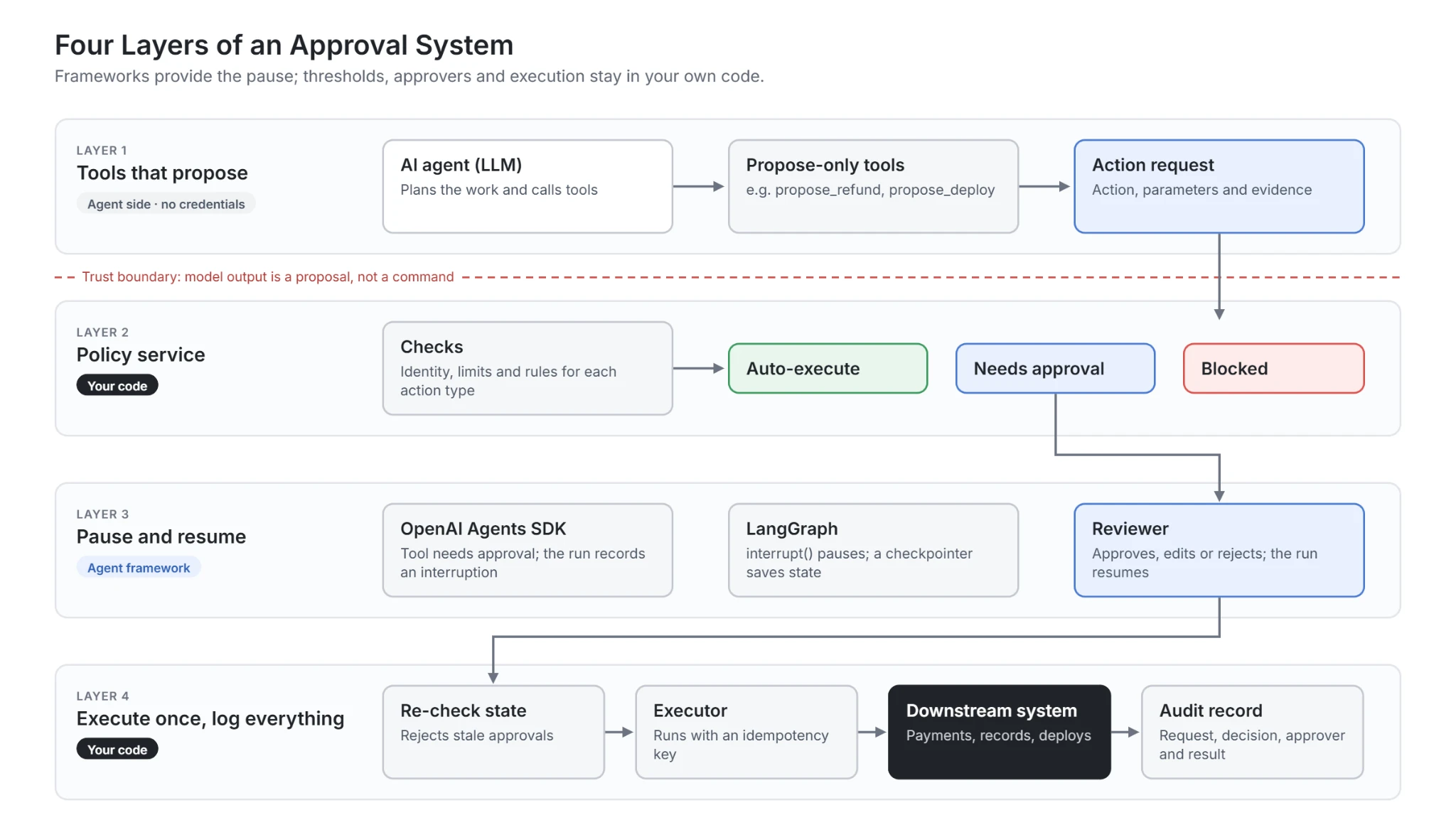
Agent frameworks now provide the pause; the business rules remain your code. Build approval in four layers so it holds even if the model misbehaves.
- 1. Give the agent narrow tools that propose, not execute: For high-impact actions, the agent’s tool should create a request, such as “propose refund” or “propose deployment”, rather than call the production system directly. The agent should never hold the credentials that perform the action.
- 2. Decide the approval path in a deterministic service: A policy service, separate from the model, evaluates each proposed action against identity, limits and rules, and returns auto-execute, needs approval or blocked. The model cannot choose its own path.
- 3. Use the framework’s pause and resume: In the OpenAI Agents SDK, tools can require approval, and the run records an approval interruption instead of executing the tool until it is resumed. In LangGraph, an interrupt pauses the graph and saves its state through a checkpointer so a person can respond later. Treat these as the mechanism for waiting; keep thresholds and approvers in your own service so they apply whatever framework or model you use.
- 4. Execute once, and log everything: The executor re-checks state, runs the action with an idempotency key where the downstream system supports it, and writes an audit record: the request, evidence, policy decision, approver, timestamps and the result from the downstream system. Messages to users should be generated from that result, not from the agent’s intent.
Metrics that show whether approval is working
| Metric | What it tells you |
|---|---|
| Share of actions auto-executed, needing approval and blocked | Whether thresholds are set sensibly, by action type |
| Approval override rate (rejected or edited requests) | How often people disagree with the agent; the main signal for moving thresholds |
| Time to decision and expired requests | Whether approver capacity matches volume |
| Approvals decided in very short times | Possible rubber-stamping |
| Incidents after approval | Whether reviewers have the context they need |
| Blocked unsafe actions | Whether policy and guardrails catch what they should |
An AB Ark Implementation Lens
AB Ark’s published AI agent approval workflow for refunds applies this framework to one action type in detail: a seven-gate pre-refund checklist, approval tiers and execution with idempotency keys. AB Ark’s Eventas case study describes an AI voice agent and workflow automation for event operations; the published case study does not describe its approval controls, so it should not be read as evidence of the specific design in this article.
FAQs
What is AI agent approval?
AI agent approval is a step in an agent workflow where a person must review and approve an action the agent proposes before it is executed. It is used for high-impact, hard-to-reverse actions such as payments, deletions, production deployments and access grants.
Which AI agent actions need human approval?
Actions that could cause significant harm if wrong and are hard to undo: moving money above a set limit, deleting data, changing records of truth, sending novel or sensitive external messages, deploying to production, granting access and making commitments such as purchases. Read-only and draft actions usually do not.
Is human-in-the-loop the same as AI agent approval?
Approval is the most common form of human-in-the-loop control. Broader human oversight also includes human-on-the-loop supervision, where actions run automatically and people monitor and intervene, and reviewing drafts before a person sends them.
How do you stop approvers from rubber-stamping AI agent requests?
Send fewer requests by automating safe actions, show the evidence and policy behind each request, offer edit and reject options, expire unanswered requests, and track override rates and review times. If reviewers approve nearly everything in seconds, the workflow needs redesigning.
Can an AI agent approve its own actions?
No. If an agent can approve its own request, the approval step is meaningless, because a prompt-injected or faulty agent could propose and approve a harmful action in the same run. Enforce the rule in code: the approval endpoint accepts only authenticated human identities, the agent’s service account has no permission to approve, and the policy service rejects any approval where the approver is the requester.
Does the EU AI Act require human approval for AI agents?
The EU AI Act requires effective human oversight for high-risk AI systems, with obligations for Annex III systems applying from 2 December 2027. It does not require approval for every agent action, but oversight must be proportionate to risk and autonomy, and overseers must be able to intervene and override.
The Rule for AI Agent Approval
Let the agent propose and gather evidence; let deterministic code decide which actions run automatically, which need a person and which are blocked. Require sign-off where impact is high and undo is hard, give reviewers everything they need to judge each request, expire what nobody answers, and measure whether approvals are real decisions or habits.
The safest AI agent is not the one that asks permission for everything. It is the one that asks at the right moments, and makes each answer count.
Schedule a Free Consultation Call ->

CEO At AB Ark Solutions