
Application modernization is the work of updating an existing application so it stays secure, supportable and adaptable. The main options are retain (leave it as is for now), rehost (move it unchanged), replatform (move it with targeted upgrades), refactor (restructure the code and architecture in steps), rebuild (rewrite from scratch), replace (buy a product) and retire. Choose per application, using business value, technical health and risk. Rebuild only when the cheaper paths cannot meet the need.
Key Takeaways
- There is no single modernization strategy. Decide per application, because a payroll system, a customer portal and a reporting tool rarely need the same path.
- AWS’s widely used 7 Rs framework treats refactoring as the most complex strategy and does not recommend it for large migrations, while recommending replatforming for applications whose components or databases are at or near end of support.
- Rebuilds carry the highest delivery risk. A 2012 McKinsey and Oxford study found large IT projects ran 45% over budget on average, so favor phased approaches such as the strangler fig pattern.
- End-of-support dates make modernization urgent: Node.js 20 reached end of life on April 30, 2026, and end-of-life PHP versions (8.1 and older) get no upstream fix for the October 2026 PHP2Shell flaws.
- Build a safety net before changing anything: tests that capture current behavior, a parallel run, and a rollback plan.
Talk to Our Team About Your Project ->
What Is Application Modernization?
Application modernization means changing an existing application, its platform or its architecture so it can keep meeting business needs. It can be as small as moving to a supported runtime or as large as replacing the application with new services. The goal is not newer technology for its own sake. It is lower risk, faster change, easier hiring and a system that connects cleanly to everything else.
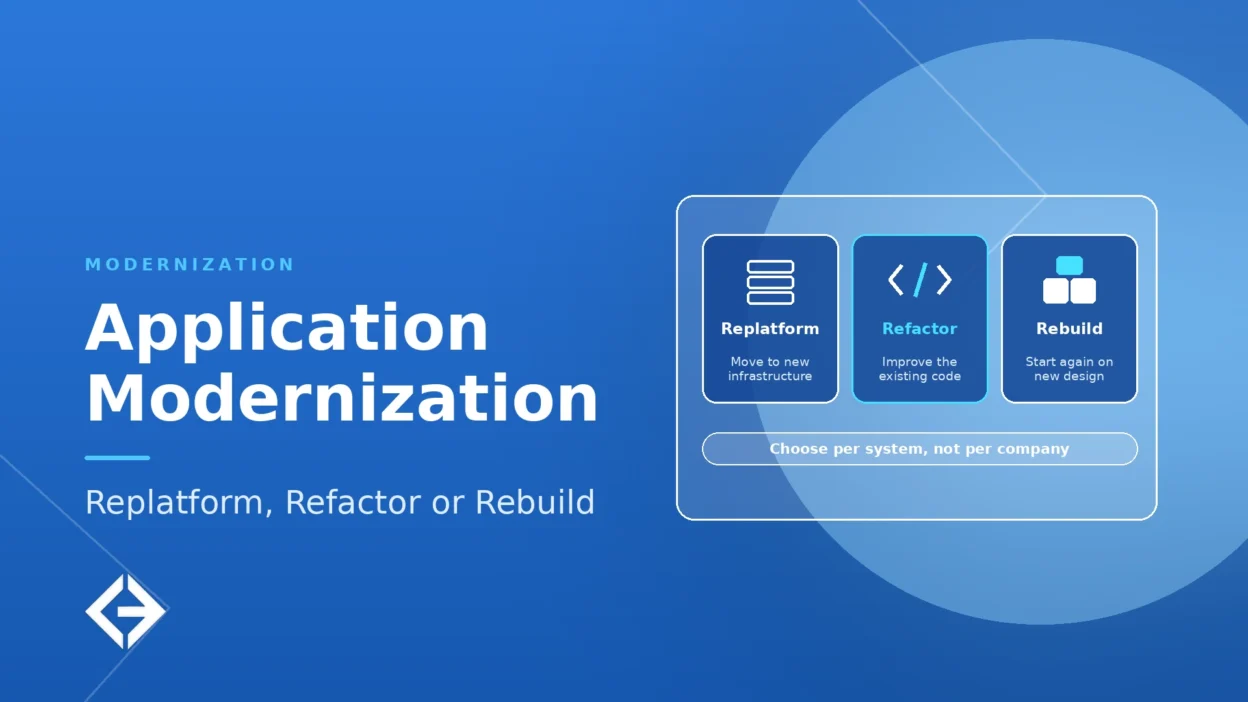
Terminology varies. This article uses these meanings: retain leaves the application as it is for now; rehost moves the application to new infrastructure unchanged; relocate (an AWS term) moves it to the cloud without changing the platform, for example VMware Cloud on AWS; replatform makes targeted changes during the move, such as a managed database or a supported runtime; refactor restructures code and architecture while preserving behavior; rebuild writes a new application to replace the old one; replace buys a product; retire switches it off. AWS’s framework uses “refactor or re-architect” for the broadest redesign, so check how any vendor defines the term.
Why Is Modernization Urgent?
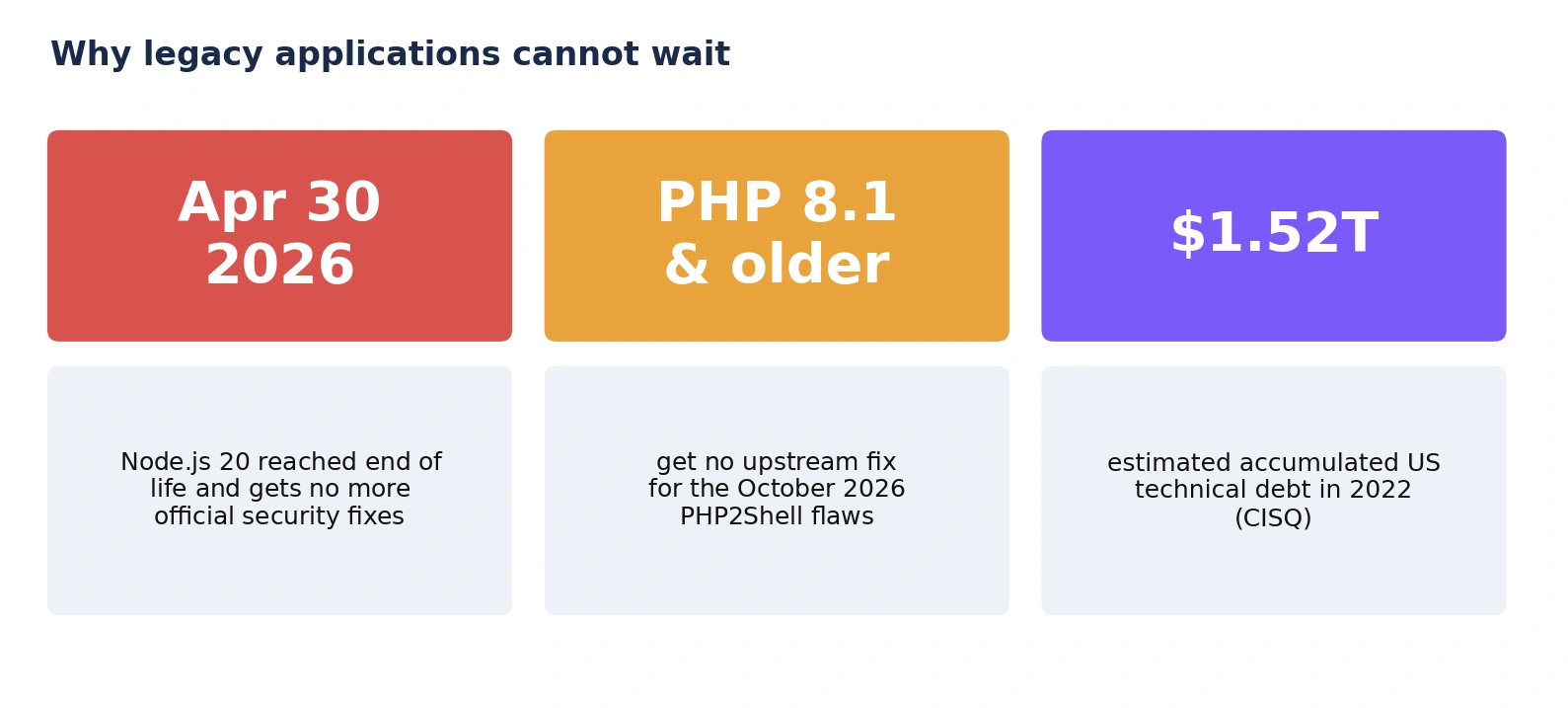
Runtimes reach end of life. The Node.js releases page lists Node.js 20 as end of life, with support ending on April 30, 2026. Applications still on it no longer receive official (upstream) security fixes.
Unsupported versions stay exposed. The UK NCSC warned that all PHP versions were affected by the October 2026 PHP2Shell vulnerabilities. TuxCare’s timeline cites an estimate of roughly 884,000 internet-facing hosts running end-of-life PHP versions (8.1 and older) that will not receive an upstream fix.
Technical debt accumulates. The CISQ 2022 report estimated that poor software quality cost the US at least $2.41 trillion, and that accumulated technical debt had grown to approximately $1.52 trillion. A summary of the report describes technical debt as the largest obstacle to changing existing code bases.
Disconnected systems block automation and AI. MuleSoft’s 2025 survey found that only about 29% of applications in the average organization are integrated, and 95% of IT leaders see integration as a hurdle to using AI effectively.
Replatform, Refactor or Rebuild: How Do the Options Compare?
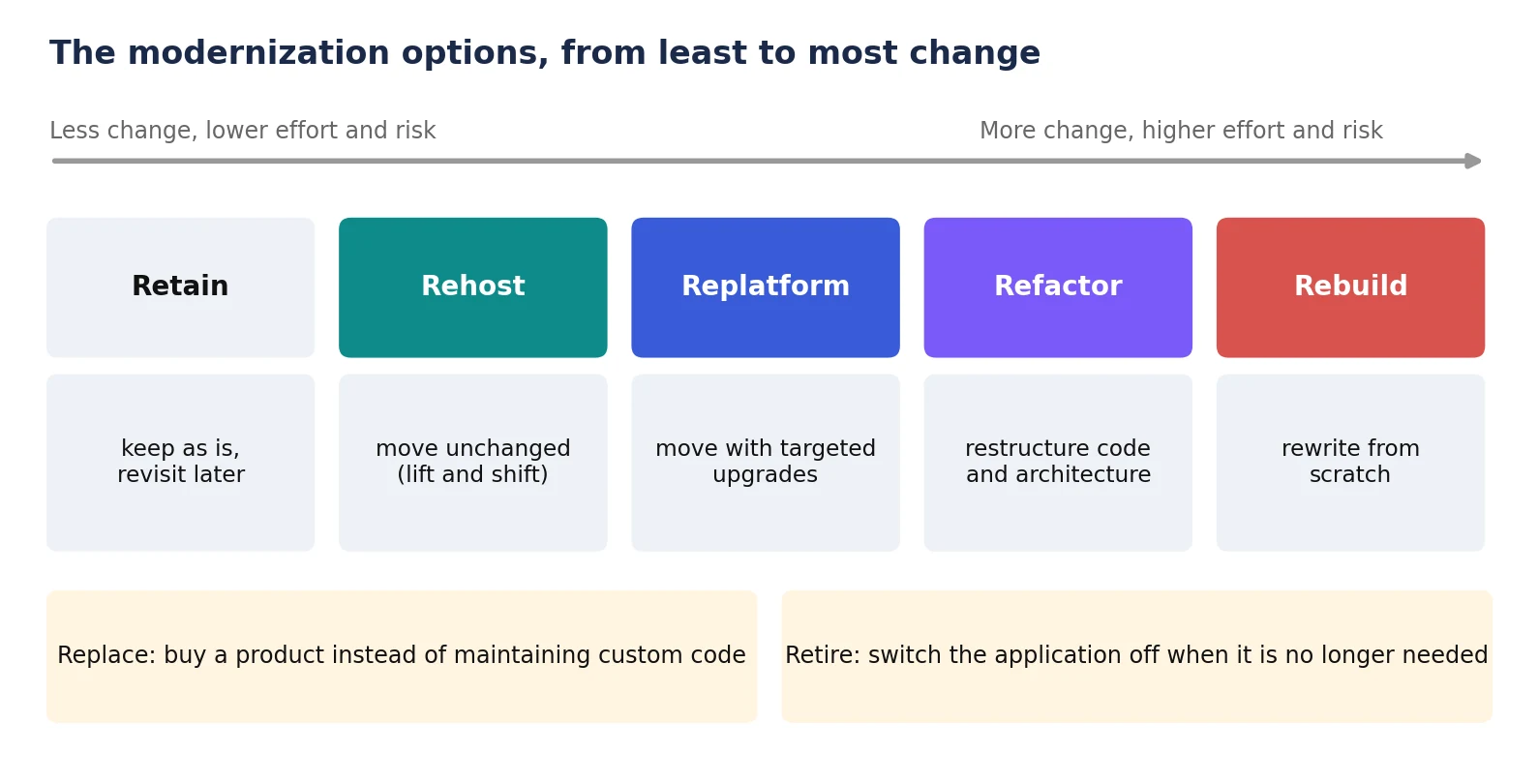
| Option | What changes | Best when | Main risk |
| Retain | Nothing, for now | Stable, low-risk, rarely changed, or too risky to touch yet | Debt and exposure keep growing |
| Rehost | Hosting only; code unchanged | Fast exit from a data center or aging hardware | Moves the problems with the application |
| Replatform | Runtime, database or hosting, with targeted code changes | Sound code on components at or near end of support | Hidden dependencies; skills needed for the new platform |
| Refactor | Code structure and architecture, in steps | Valuable business logic trapped in a hard-to-change design | Long program; behavior drift without tests |
| Rebuild | Everything: a new application replaces the old | Core design cannot meet needs and behavior can be specified | Highest cost and schedule risk; lost undocumented behavior |
| Replace | Custom code swapped for a product | A product covers the process well enough | Fit gaps; data migration; vendor lock-in |
| Retire | The application is switched off | No longer needed, or duplicates another system | Hidden users and data dependencies |
Sources: AWS Prescriptive Guidance on migration strategies. The framework is cloud-focused, but the options apply to any modernization. AWS notes that common strategies for large migrations are rehost, replatform, relocate and retire, and that refactor is not recommended for large migrations because it modernizes the application during the migration and is the most complex to manage. The options table adapts the AWS 7 Rs: it adds rebuild, calls repurchase “replace” and leaves out relocate, which is defined above.
AWS also recommends replatforming applications that use components or databases that have reached, or are close to, their end-of-support date, and suggests first rehosting an application and then upgrading it in the cloud. For legacy applications on aging runtimes, rehosting first and upgrading afterward can be a sensible first step.
How Do You Choose the Right Path for Each Application?
Score every application against the same criteria, then use the answers to choose a path. A short, consistent assessment beats a long debate about one favorite system.
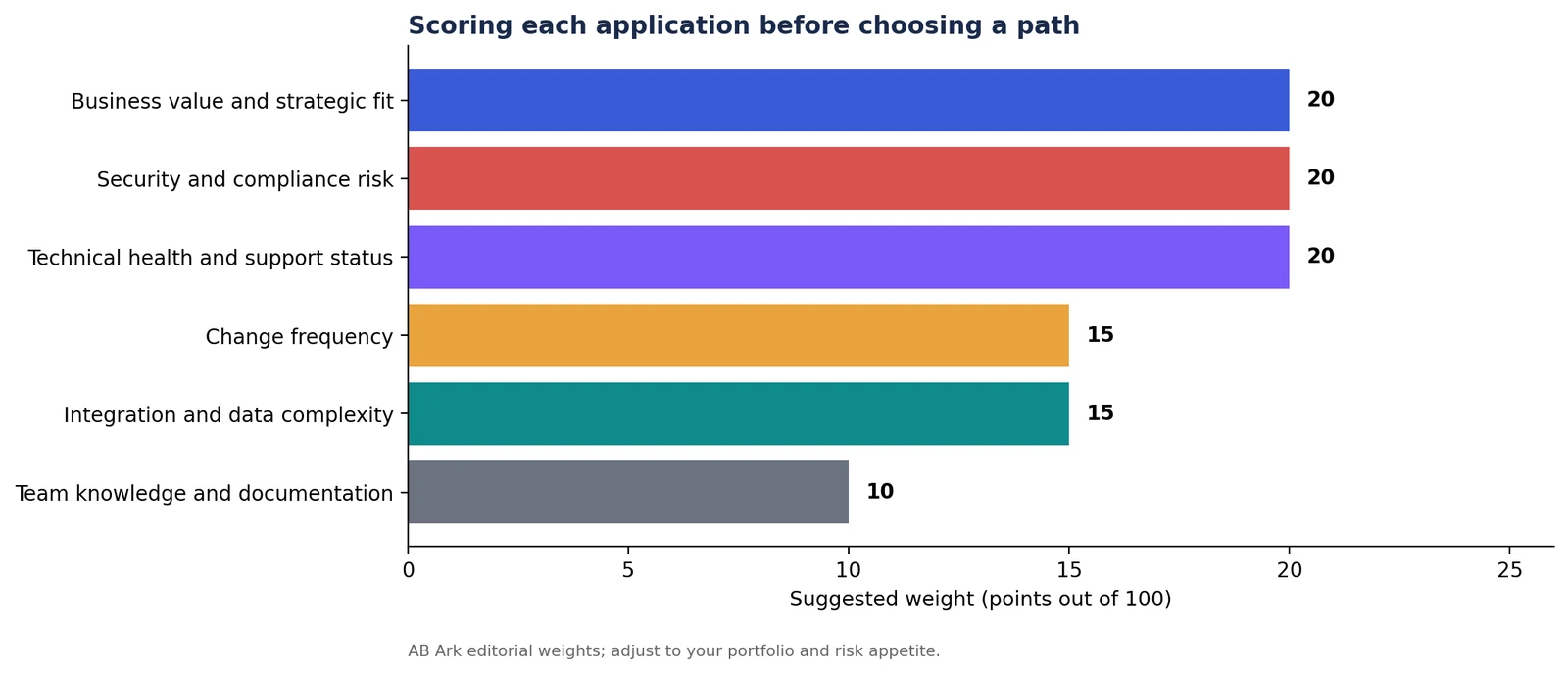
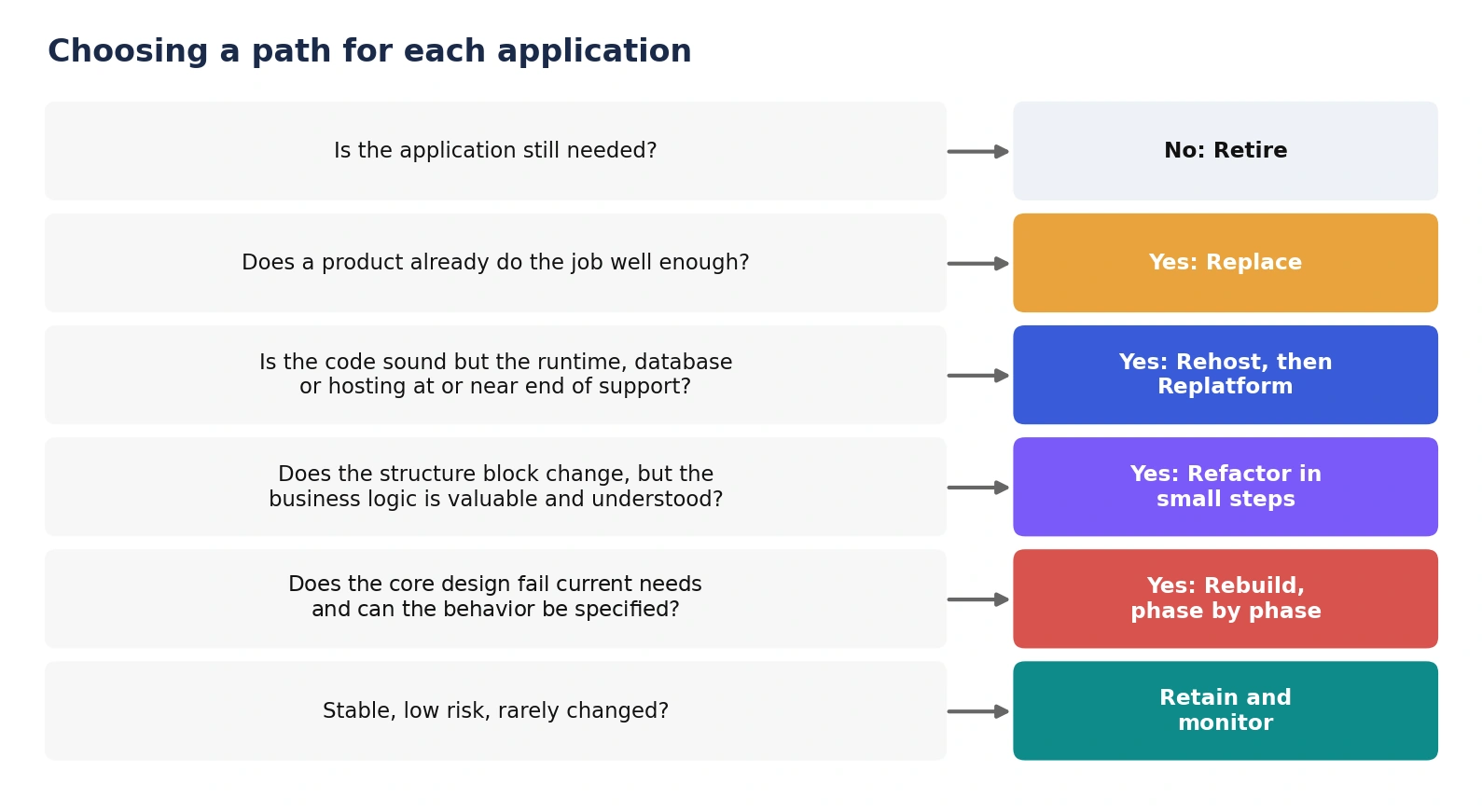 Business value and strategic fit: is it core to revenue or differentiation, or a commodity process?
Security and compliance risk: unsupported runtimes, unpatched dependencies, sensitive data and regulatory duties raise urgency.
Technical health: support status of the runtime, framework and database; test coverage; build and deploy reliability.
Change frequency: applications that change often reward refactoring; those that rarely change may only need a safe platform.
Integration and data complexity: many connections and large data stores make rebuilds and cutovers harder.
Team knowledge: is the behavior documented, and does anyone who understands it remain?
When Does Replatforming Make Sense?
Replatform when the application is fundamentally sound but sits on components that are aging, unsupported or expensive to run. Typical moves include upgrading to a supported runtime or framework version, moving the database to a managed service, containerizing the application, or changing hosting. The code changes are targeted rather than structural, so the effort and risk are moderate.
Before replatforming, list every dependency and integration, test the application on the new platform with production-like data, and plan a rollback. Replatforming also needs skills to run the new platform, which is a frequent hidden cost.
When Does Refactoring Make Sense, and How Do You Do It Safely?
Refactor when the business logic is valuable but the structure blocks change, for example a tightly coupled monolith where every release is risky. The safest approach is incremental, using two patterns from Microsoft’s Azure Architecture Center.
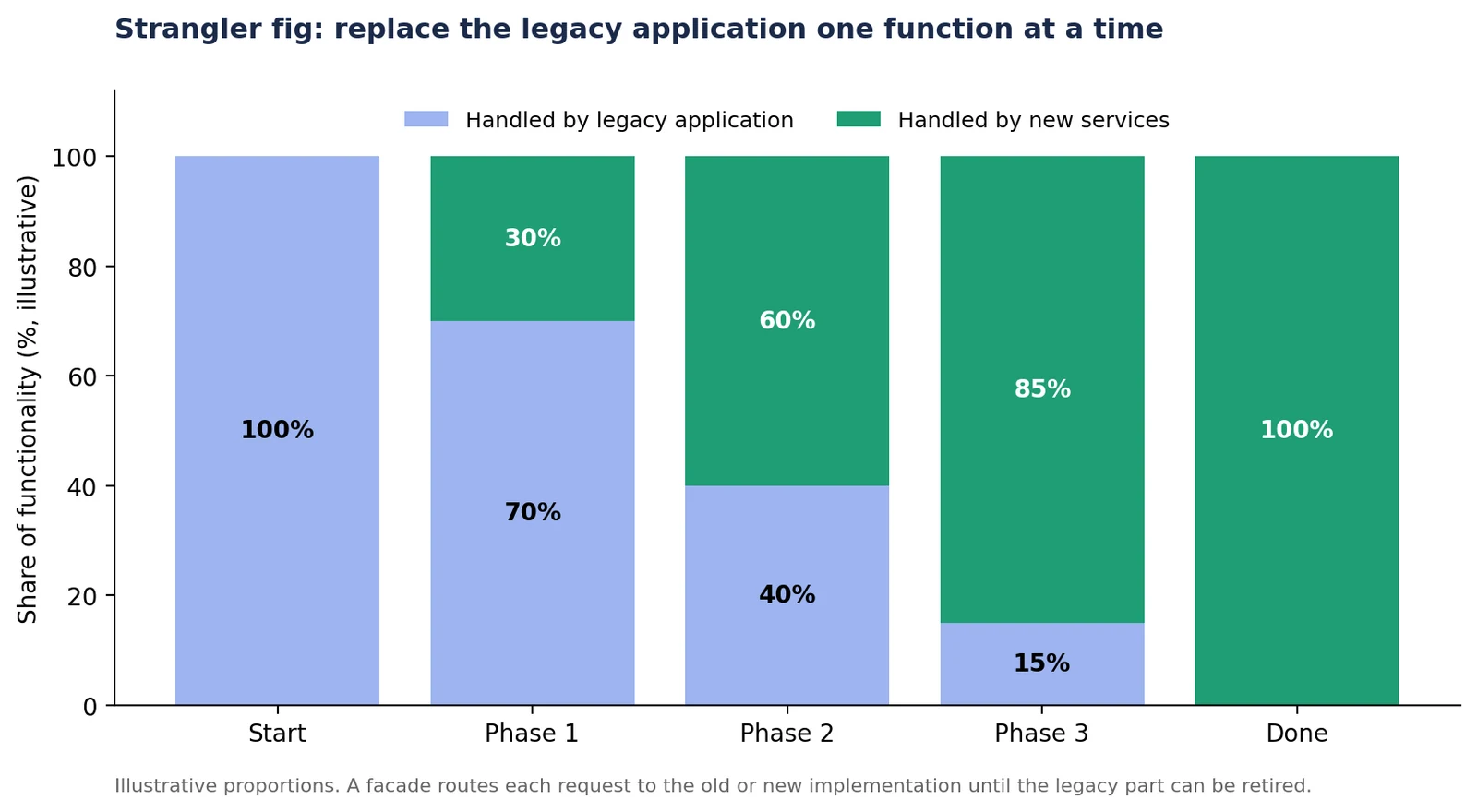 Strangler fig: Microsoft describes the pattern as introducing a façade, or proxy, between clients, the legacy system and the new system, and replacing specific pieces of functionality with new services over time. Consumers keep using the same interface, and the façade is usually removed once the migration is complete.
Anti-corruption layer: Microsoft describes this layer as an adapter that translates between systems with different semantics, so the new design is not constrained by the legacy model. It adds latency and another service to run, and may be unnecessary when the systems are semantically similar.
Start refactoring where change is most frequent or risk is highest, and keep each slice small enough to release, test and roll back independently.
When Is a Rebuild Justified?
A rebuild is justified when the core design cannot meet current needs, the technology cannot be supported or hired for, and the required behavior can be specified. It is the riskiest option. A 2012 McKinsey and Oxford study of more than 5,400 large IT projects found they ran 45% over budget and 7% over time on average while delivering 56% less value than predicted, and that longer schedules added to overruns.
Reduce that risk by treating the old system as a specification, not a nuisance:
Write characterization tests that record what the current system actually does before building anything.
Rebuild in phases, with each release delivering usable value, rather than a single big-bang cutover.
Run old and new in parallel and compare outputs before switching traffic.
Plan data migration early: mapping, cleansing, reconciliation and a rollback path.
Keep a sunset plan, because the legacy system is only retired when the replacement is proven.
How Do You Protect Behavior and Data During Modernization?
Characterization and contract tests: capture existing behavior and the agreed interfaces so regressions are caught immediately.
Parallel run or shadow mode: send the same inputs to old and new, compare results, and act only on the proven path.
Canary releases: move a small share of users first and watch error rates and business metrics.
Data reconciliation: compare record counts and key fields between old and new stores throughout.
Rollback: every release slice needs a tested way back.
Integrations: inventory and test every connection, as most surprises appear at the edges. AB Ark covers this in its guide to custom software integration.
How Should You Use AI Tools in Modernization?
AI coding tools can speed up understanding legacy code, generating tests and drafting migrations, but they raise new risks and should never replace review. Veracode’s 2025 report found that AI-generated code introduced security flaws in 45% of its test cases, and a USENIX Security 2025 study found that 19.7% of packages suggested by code-generating models did not exist.
Generate tests first, then review them: confirm they fail when behavior changes.
Treat AI-written migrations as untrusted: run security scans and verify every dependency exists.
Keep humans responsible for architecture and data decisions.
Record which code was AI-assisted so reviewers can focus effort.
What Does Modernization Cost and How Long Does It Take?
Cost and duration depend on the path, the size of the application and how well its behavior is understood. Replatforming is usually the shortest and cheapest; rebuilding the longest and most uncertain. The main drivers are:
Size and age of the codebase, and the quality of its documentation and tests.
Number and difficulty of integrations and data stores.
Security and compliance requirements, and the cost of testing them.
Whether old and new must run in parallel, and for how long.
Team location and seniority: Accelerance’s 2026 rates guide puts senior developer partner rates at about $31 to $41 an hour in Asia, $60 to $75 an hour in Latin America and $64 to $76 an hour in Europe.
Ask any provider for a phased estimate, with a fixed-scope assessment first, so you buy information before you commit to the full program.
Get a Custom Project Cost & Timeline Estimate ->
What Does a Modernization Roadmap Look Like?
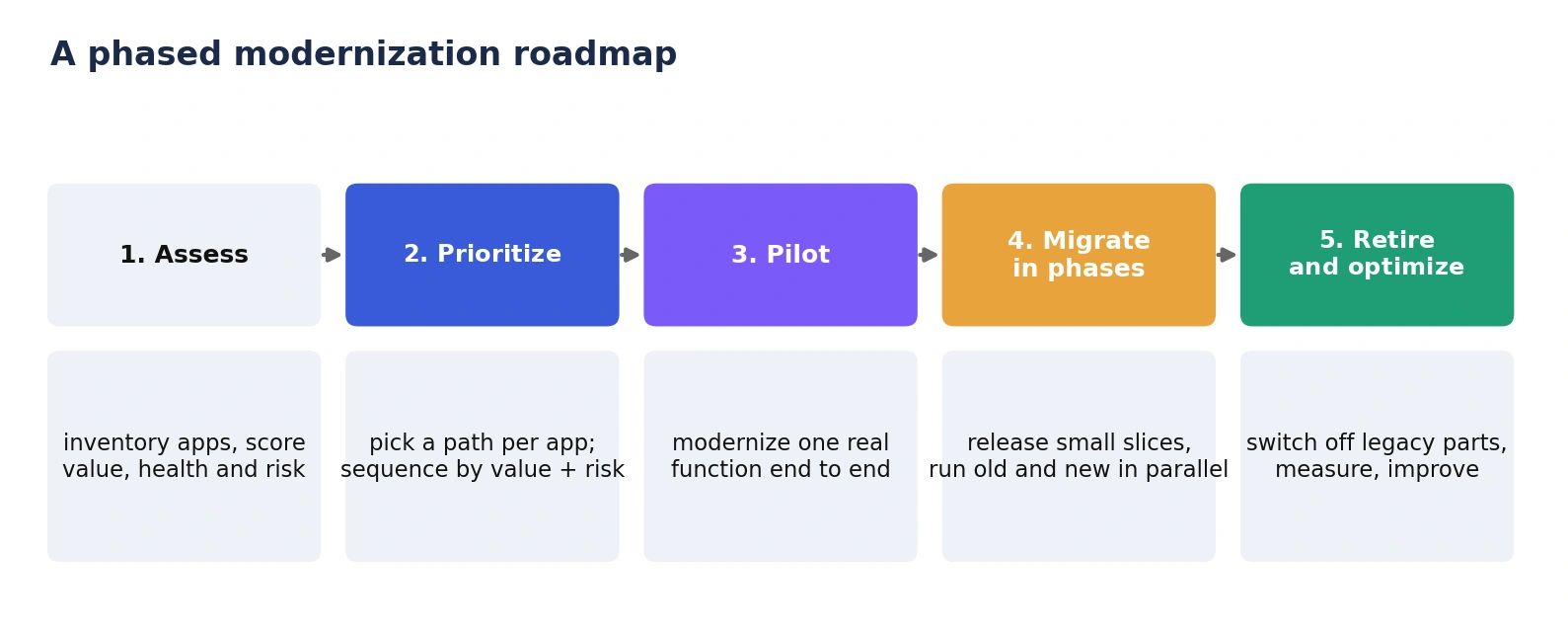
- Assess: inventory applications and score them for value, health and risk.
- Prioritize: choose a path per application and sequence by value and risk.
- Pilot: modernize one real function end to end to test the approach.
- Migrate in phases: release small slices, run old and new in parallel, and reconcile data.
- Retire and optimize: switch off legacy parts, measure results and improve.
What Should You Ask a Modernization Partner?
How will you assess our applications, and what will the assessment deliver?
Which path do you expect for each application, and why not the next one up?
How will you capture current behavior before changing it?
How will old and new run in parallel, and how does rollback work?
How will data be migrated and reconciled?
Who owns the code, infrastructure and documentation when the project ends?
How do you use AI tools, and how is their output reviewed?
Red flags: a recommendation to rebuild before any assessment, no tests or parallel run, a big-bang cutover date, and a proposal that ignores integrations and data.
How AB Ark Approaches Application Modernization
AB Ark Solutions builds custom software and AI solutions and helps teams modernize applications step by step. Engagements typically begin with an assessment, then deliver one working slice at a time, with tests, parallel running and rollback planned from the start. AB Ark’s case studies show the range of software it has delivered, and teams planning modernization alongside AI features can start with the AI agent development service.
FAQs
What is application modernization?
Updating an existing application, its platform or its architecture so it stays secure, supportable and adaptable. Options range from moving it unchanged to rewriting it, and the right choice depends on each application.
What is the difference between replatform, refactor and rebuild?
Replatform moves an application with targeted changes such as a supported runtime or managed database. Refactor restructures code and architecture while preserving behavior. Rebuild writes a new application to replace the old one.
When should you rebuild instead of refactor?
When the core design cannot meet current needs, the technology cannot be supported or hired for, and the required behavior can be specified. Otherwise, incremental refactoring carries less delivery risk.
How long does application modernization take?
It depends on the path and the application. Replatforming is typically shortest and rebuilding longest. Phased delivery makes progress visible early, and an assessment gives a realistic estimate.
Can you modernize an application without downtime?
Often, yes, using the strangler fig pattern, parallel running, canary releases and tested rollback. Cutovers that need downtime can usually be shortened by migrating data incrementally.
Modernize per application, protect behavior with tests, move in phases, and keep the legacy system until the replacement has proved itself.
Schedule a Free Consultation Call ->
CTO & Co-founder At AB Ark Solutions