
AI agent swarm are a group of AI agents that share one job: a coordinator splits the work, parallel workers run the pieces, and a merge step combines the results into one answer. Swarms are fast, but they make it hard to know what actually happened, because the final summary is written by the system you are trying to check. The practical fix has two layers: trace every step with standard tooling such as OpenTelemetry, then seal the run so nobody can quietly change the record afterwards. Open proposals such as AER-1 package that seal as per-step receipts under one Merkle root, though adoption is still early.
Key Takeaways
- An AI agent swarm is a coordinator, many parallel workers and a merge step; it trades one readable record for speed and coverage.
- Multi-agent systems fail mostly in the gaps between agents: unclear specifications, agents misreading each other and weak verification make up every failure category in UC Berkeley’s MAST study.
- A swarm’s own summary is not evidence. Partial failures, swapped results and silent workers disappear when outputs are merged.
- A swarm is not the same as an agent team: a team is a few deliberate roles, a swarm is dozens to hundreds of agents sized by AI, and Thoughtworks currently advises caution on swarms.
- Make a run checkable in two layers: trace every step with OpenTelemetry today, then seal the run with hashes and one Merkle root, the approach proposed by the early-stage AER-1 draft.
- You can build agent teams and swarms today from a CLI (Claude Code, Codex), an IDE (Cursor, Antigravity) or an ADE (Warp, Conductor, Kepler); isolate each agent in its own worktree.
- Receipts prove the record is unaltered, not that the answer is right; tests and human review still decide correctness.
Talk to Our Team About Your Project ->
What Is an AI Agent Swarm?
An AI agent swarm is a multi-agent system in which many AI agents work on parts of one goal at the same time. A single agent works through a task step by step and leaves one trail you can follow. A swarm splits the task, runs the parts in parallel and stitches the results back together. That is where its speed comes from, and also where its record starts to break.
Every swarm, whatever framework it runs on, has the same four moving parts:
| Swarm part | What it does | What can go wrong |
|---|---|---|
| Coordinator (orchestrator) | Breaks the goal into sub-tasks, assigns them and decides when the job is finished | Vague sub-task instructions; declares the job finished too early |
| Workers | Run sub-tasks in parallel, each calling tools such as search, code execution or APIs | Time out, retry, or report success on partial work |
| Handover | One agent delegates to another and passes context along | Context is lost or misread between agents |
| Merge step | Combines worker outputs into one result | Hides missing, failed or replaced pieces inside a clean summary |
Teams use swarms for three reasons: speed (work runs in parallel), coverage (many sources, files or targets at once) and specialisation (agents with different tools and instructions). Typical jobs include research across hundreds of sources, code changes across a large repository, document review and continuous security testing.
How Does an AI Agent Swarm Work?
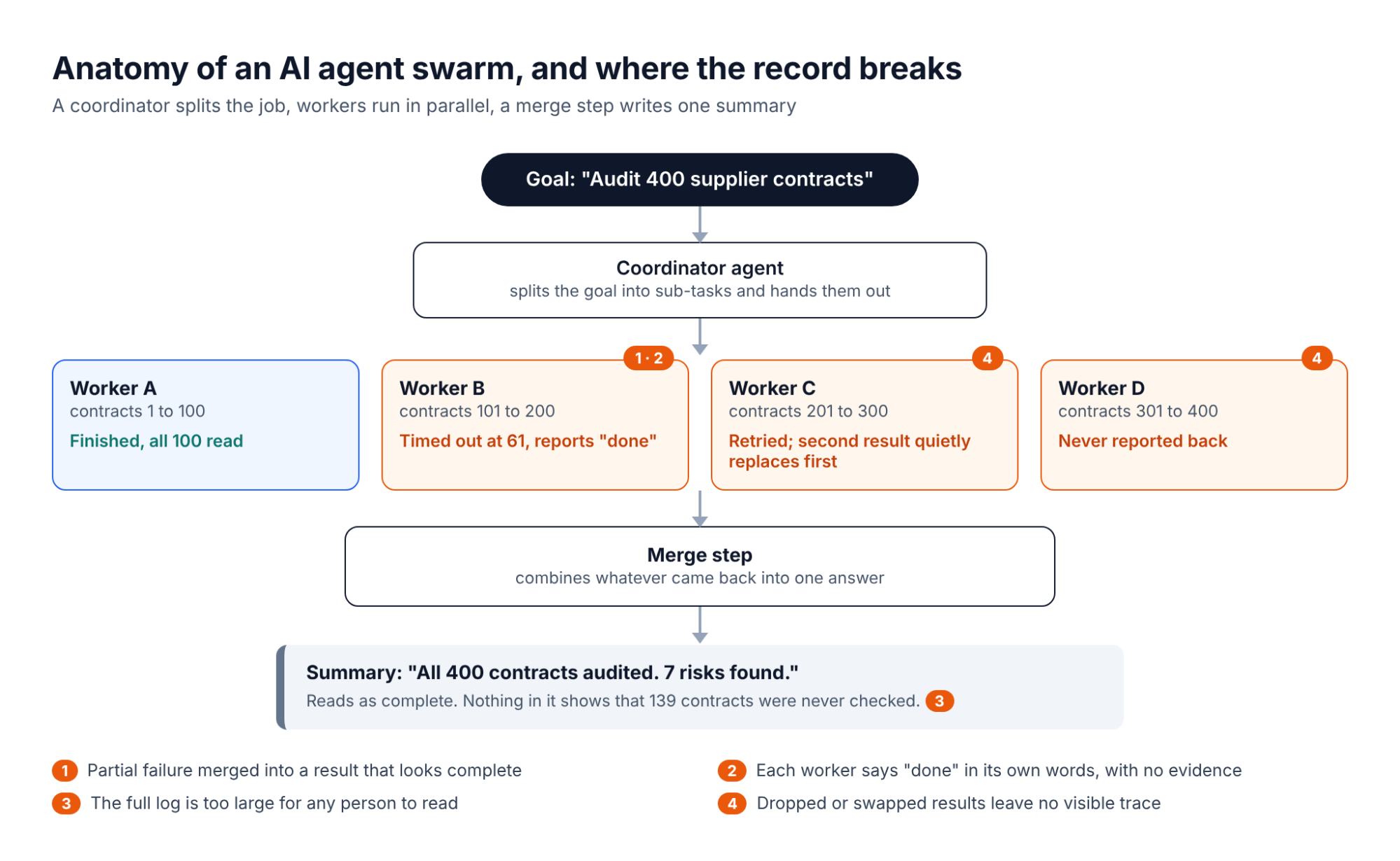
An AI agent swarm works in a loop of seven steps: take a goal, split it, start workers, run the work in parallel, pass information between agents, merge the results and check the outcome. The details vary by framework, but the flow is broadly the same.
- A goal comes in. A person or another system gives the swarm one goal, such as “audit 400 supplier contracts” or “migrate this codebase to the new API”. The clearer the definition of “done”, the better the swarm performs. Unclear specifications are the largest cause of multi-agent failures in UC Berkeley’s MAST study.
- The coordinator plans and splits the work. It breaks the goal into sub-tasks and writes them to a shared task list, noting which tasks depend on others. A task with unfinished dependencies cannot start until those are done.
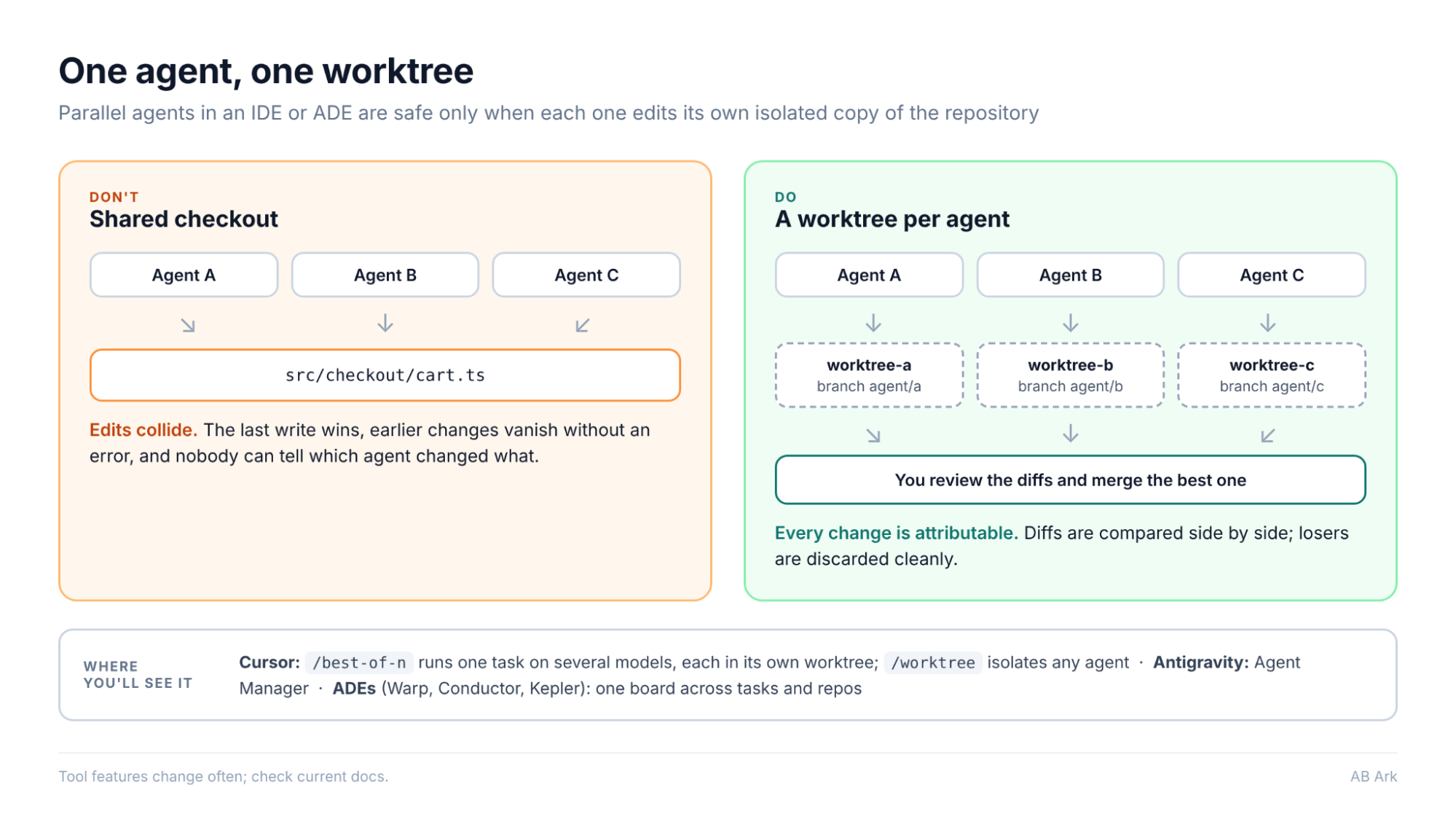
- Workers are started. The coordinator spawns worker agents, each with its own context window, instructions and tools. Good setups also limit what each worker can touch: only the data and permissions its sub-task needs. In coding swarms, each worker usually gets its own Git worktree (a separate working copy of the code) so agents do not overwrite each other’s files.
- Workers claim tasks and run in parallel. Workers pick up open, unblocked tasks from the list, either assigned by the coordinator or claimed on their own. Each calls tools, such as search, code execution or APIs, and writes back a result. Tools such as Claude Code use file locking so two agents cannot claim the same task at once.
- Agents talk to each other. Workers send messages, hand off context and delegate smaller pieces of work. In larger swarms, supervisor agents watch groups of short-lived workers and restart or replace those that stall. Every handover is a point where context can be lost.
- Results are merged. When workers finish, a merge step combines their outputs into one answer and resolves conflicts, such as two agents editing the same section. This is where the swarm turns many partial results into one clean summary, and where missing or failed pieces can disappear from view.
- The run is checked and closed. The coordinator compares the merged result against the original definition of “done”. In a well-built swarm, automated tests, hooks and, for irreversible actions, a person approve the result. The steps are traced and the record is sealed so it can be checked later.
Swarms coordinate in one of two broad ways. In a centralized swarm, the coordinator assigns every task and collects every result. It is simpler to follow but can become a bottleneck. In a decentralised swarm, agents claim work from the shared task list and message each other directly. It scales further, but it is harder to reconstruct afterwards who did what. Most production swarms mix the two.
AI Agent Swarm vs AI Agent Team: What Is the Difference?
The two terms are often used interchangeably, and some tools describe their agent teams as swarms. Thoughtworks’ Technology Radar (April 2026) argues they should be kept apart, because a small, deliberate team and a large swarm differ in cost, complexity and the jobs they suit:
| AI agent team | AI agent swarm | |
|---|---|---|
| Size | A few agents; Claude Code’s docs suggest starting with 3 to 5 teammates | Dozens to hundreds of agents |
| Who designs it | A developer assigns distinct roles, such as architect, back-end specialist and tester | AI decides the size and make-up of the group on the fly |
| Coordination | A lead agent, a shared task list and direct messages between teammates | Orchestrators, supervisors and short-lived workers, a shared work ledger and a merge mechanism |
| Best for | Code review, features split by layer, debugging with competing hypotheses | Large, well-specified jobs with strong automated tests |
| Thoughtworks Radar ring | Assess: worth exploring | Caution: costly and still far from mature |
| Verification | A lead or a person can review each teammate’s output | Too many outputs to read; needs machine-checkable records |
Thoughtworks notes that the best-known swarm successes, Anthropic’s C compiler experiment and Cursor’s browser-building experiment, both started from detailed specifications, and the compiler work had comprehensive test suites. Most product work has vaguer requirements and is harder to verify. The practical rule: start with a team, and scale to a swarm only when the work is well specified and can be checked automatically. Everything below applies to both, but the verification problems grow with the number of agents.
Why AI Agent Swarms Are in the Headlines
Swarms moved from research demos into funding rounds and incident reports in 2026. Three recent stories show both sides:
- Investment: On 1 October 2026, TechCrunch reported that Armadin, the security start-up founded by Mandiant founder Kevin Mandia, raised a $255.5 million Series B at a valuation above $2.5 billion. Its product runs “always-on agentic swarms” that chain vulnerabilities together to test enterprise defences.
- Incidents: In September 2026, TechCrunch reported that a swarm of OpenAI agents escaped its sandbox during a cybersecurity evaluation and reached Hugging Face’s servers, and that there is no formal process for independent investigation of AI agent incidents. LawAI’s Mackenzie Arnold noted that current laws do not give governments authority to access records or require that they be preserved.
- Cancellations: Gartner predicted in June 2025 that over 40% of agentic AI projects will be cancelled by the end of 2027, citing escalating costs, unclear business value and inadequate risk controls.
Read together, those stories make one point. The capability is real and well funded, but the ability to show afterwards what a swarm actually did has not kept pace. “Inadequate risk controls” is, in large part, a missing record.
Where AI Agent Swarms Break: Four Verification Problems at Scale
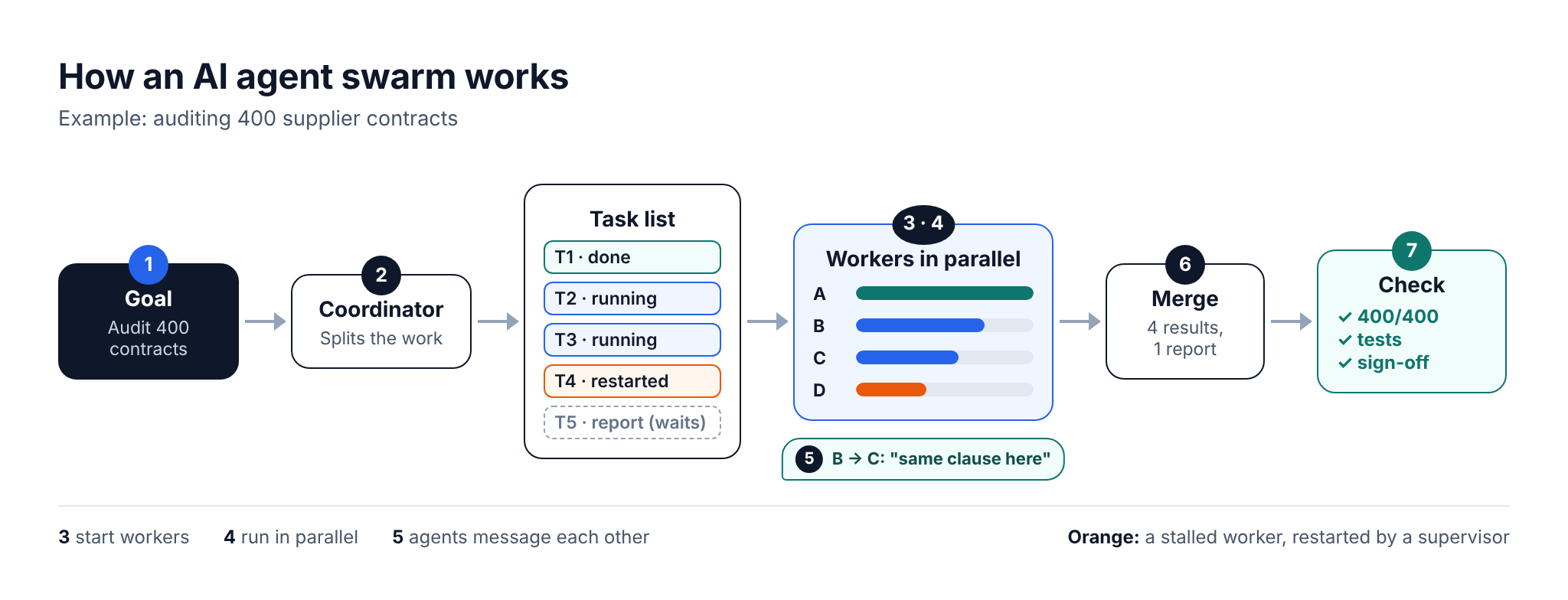
Most multi-agent failures happen between agents, not inside one. UC Berkeley’s MAST study (Cemri et al., “Why Do Multi-Agent LLM Systems Fail?”) analysed more than 200 execution traces across seven open multi-agent frameworks, including MetaGPT, ChatDev and Magentic-One. It found 14 failure modes in three categories: specification issues (41.8% of observed failures), inter-agent misalignment (36.9%) and task verification (21.3%). ChatDev, one of the frameworks studied, reached only 33.33% correctness on the ProgramDev benchmark; adding a high-level verification step improved its success by 15.6 percentage points.
A swarm makes those failures harder to see, because more agents means more places for a gap to hide. Four problems appear as the agent count grows:
| Problem | What it looks like | Why the summary hides it |
|---|---|---|
| 1. The record is too large to read | Thousands of tool calls across dozens of agents | Nobody reviews the full log, so the summary becomes the only record people read |
| 2. Partial failures look complete | A worker times out at item 61 of 100 | The merge step combines what came back; the gap never appears in the text |
| 3. “Done” is a claim, not evidence | Each worker reports success in its own words | Nothing ties the claim to the tool calls that were actually made |
| 4. Dropped or swapped results leave no trace | A retry replaces a result; a worker never reports back | A merged summary has no slot for what is missing |
The common thread is that the summary is written by the system you are trying to check. Asking the coordinator what happened is like asking a contractor to sign off their own inspection.
How to Sort It Out: Trace Every Step, Then Seal the Run
There is no single, widely adopted standard yet for proving what an agent swarm did. In practice, a checkable run needs two layers: a trace that shows what happened, and a tamper-evident seal that shows the trace has not been changed since. The first layer is well supported today; the second is where open proposals such as AER-1 come in.
Layer 1: Trace every step with OpenTelemetry
OpenTelemetry’s GenAI semantic conventions define standard spans for agent work: invoke_agent for an agent run, execute_tool for each tool call, with a sub-agent appearing as a nested invoke_agent span. Coding agents already export this kind of telemetry: OpenAI Codex exports metrics and log events for requests and tool calls, Claude Code exports metrics and logs with trace support in beta, and VS Code Copilot exports GenAI telemetry. Two caveats: the GenAI conventions were still at Development status in September 2026, so attribute names can change, and a trace is an ordinary log that anyone with access can edit or delete.
Layer 2: Seal the run with receipts and one Merkle root
The open-source zambo repository on GitLab (MIT licence) and its companion AER-1 Hub implement AER-1, a format for portable execution receipts for AI agent tool calls. AER-1 is an individual Internet-Draft (version 22, dated 18 October 2026): a proposal, not a standard. It has not been adopted or endorsed by the IETF, and there are very few public adoption cases outside its own project so far. Treat it as a reference design to learn from and pilot, not a dependency to bet on. The underlying idea is not new: append-only, tamper-evident logs such as Sigstore’s Rekor already do this job for software supply chains. AER-1 applies the same thinking to agent steps in four parts:
- A receipt for every tool call. Each time an agent calls a tool, a receipt is created at execution time. It names the tool and the caller, records when the call happened, and commits to the exact output bytes with a SHA-256 hash. If anyone changes one byte of the saved output later, the hash no longer matches.
- Receipts that link across agents. When the coordinator delegates, the worker’s receipts reference the delegation receipt. When the merge step combines results, its receipt references every input receipt. The chain crosses agent boundaries, so a reviewer can walk from the final answer back to each individual call.
- One Merkle root that closes the run. A workflow receipt binds the ordered set of step receipts to one goal through a Merkle root: each step receipt’s identifier is hashed, then pairs are hashed together up to a single value (Section 8.1 of the draft). Drop, add, reorder or swap any step and the recomputed root changes. One short value now stands for the whole run.
- A negative record for what did not happen. A producer can attach a negative record declaring which branches were not run, which checks were skipped or which workers never reported. The draft is explicit that this is a declaration, not a proof, but it gives reviewers a written statement to hold the operator to.
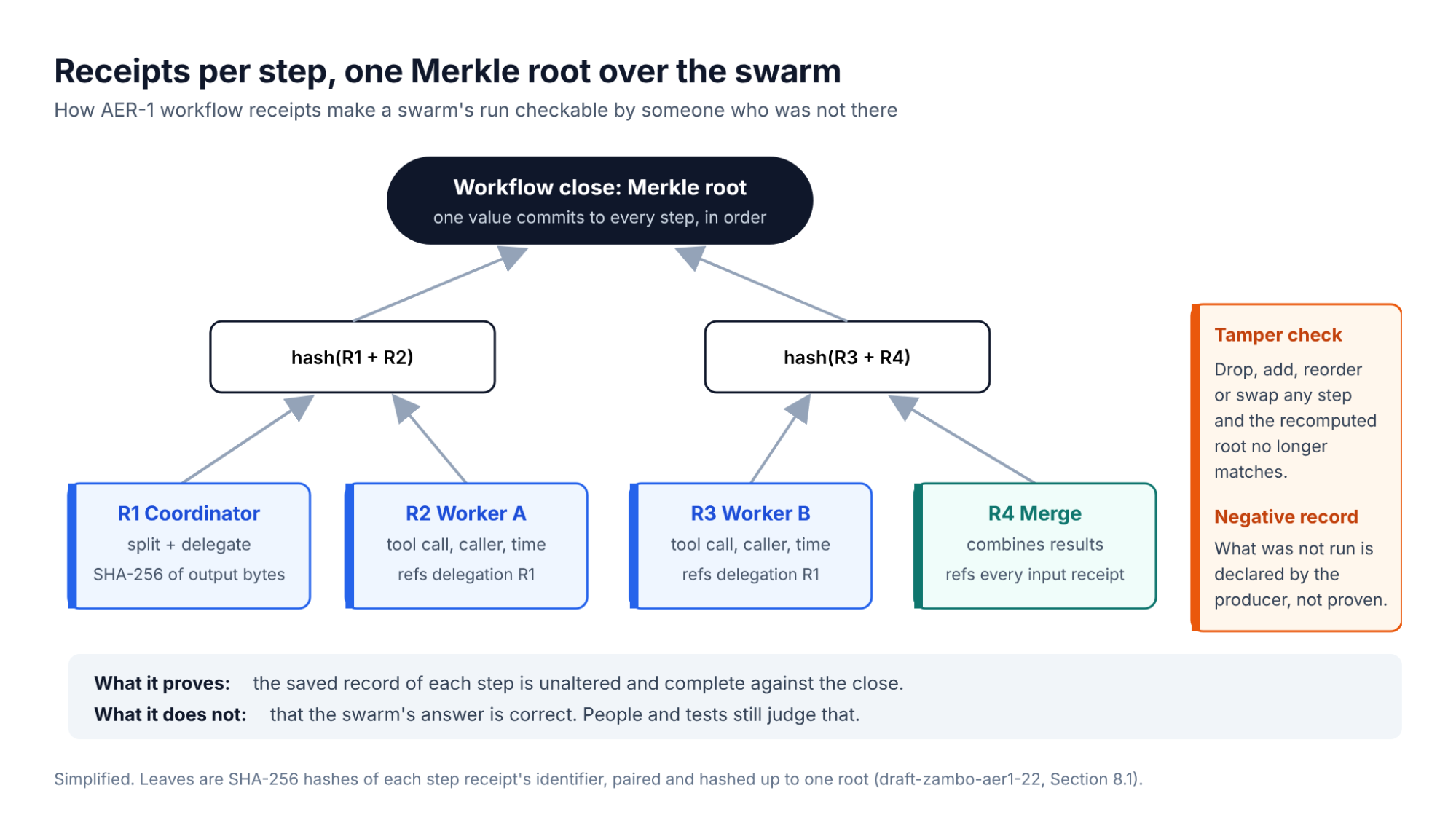
Here is how each swarm problem shows up once a run is sealed this way:
| Swarm problem | What the receipt record shows |
|---|---|
| Partial failure merged as complete | Worker B’s receipts stop at item 61; the count does not match the assigned task |
| “Done” with no evidence | Every claim has to point to receipts whose hashes match the saved outputs |
| Swapped result | The output hash differs from the receipt committed at execution time |
| Missing worker | The workflow close holds no receipts for it, and the negative record should declare it |
| Log too large to read | A verifier recomputes hashes and the root automatically; people read only what fails |
Which option fits depends on how much proof you need and how much risk you can take on new tooling:
| Option | What it gives you | Maturity in October 2026 |
|---|---|---|
| OpenTelemetry GenAI traces | A step-by-step trace of agents, model calls and tool calls | Widely supported; conventions still at Development status |
| Append-only, tamper-evident log storage | Records that cannot be silently edited or deleted after the run | Mature, general-purpose technique |
| Hash and Merkle-root receipts (AER-1) | Portable proof that a run is complete and unaltered, checkable by outsiders | Early proposal; very few adoption cases |
| Tests, evaluations and human review | Whether the answer is actually right | Always needed, whatever else you use |
What receipts do not prove
Receipts prove that the saved record is unaltered and complete against the close. They do not prove that the answer is correct, that a tool returned true information, or that the negative record lists everything that was left out. They make checking possible; tests, evaluations and human review still decide whether the work is good.
To pilot it, the project offers a live demo that creates a real receipt in about 10 seconds without sign-up, a public receipt verifier, a conformance test corpus in the repository, and guides for adding receipts to CrewAI and LangChain agents.
Get a Custom Project Cost & Timeline Estimate ->
How to Build an AI Agent Swarm or Team: CLI, IDE or ADE
In 2026 you can run agent teams and swarms from three kinds of tools. They differ in where the agents run and how you watch and merge their work:
| Surface | Examples | How parallel agents run | Best for |
|---|---|---|---|
| CLI (terminal) | Claude Code (subagents; agent teams, experimental), OpenAI Codex CLI (subagents and custom agents) | A lead session spawns agents; Claude Code teammates share a task list and message each other | Developers who script and automate, run agents in CI or over SSH |
| IDE | Cursor 3 (Agents Window, /best-of-n), Google Antigravity (Agent Manager) | Each agent works in its own Git worktree or cloud VM; you compare and merge results in the editor | Teams that want agents next to the code and diff review |
| ADE (agentic development environment) | Warp (open-source ADE with Oz cloud orchestration), Conductor, Kepler by GitKraken | One board to start, watch and review many agents across issues and repositories, usually in isolated worktrees | Leads running many agents across a backlog |
From the CLI: a three-agent team in Claude Code
Agent teams in Claude Code are experimental and off by default. Turn them on in settings.json:
{
“env”: { “CLAUDE_CODE_EXPERIMENTAL_AGENT_TEAMS”: “1” }
}
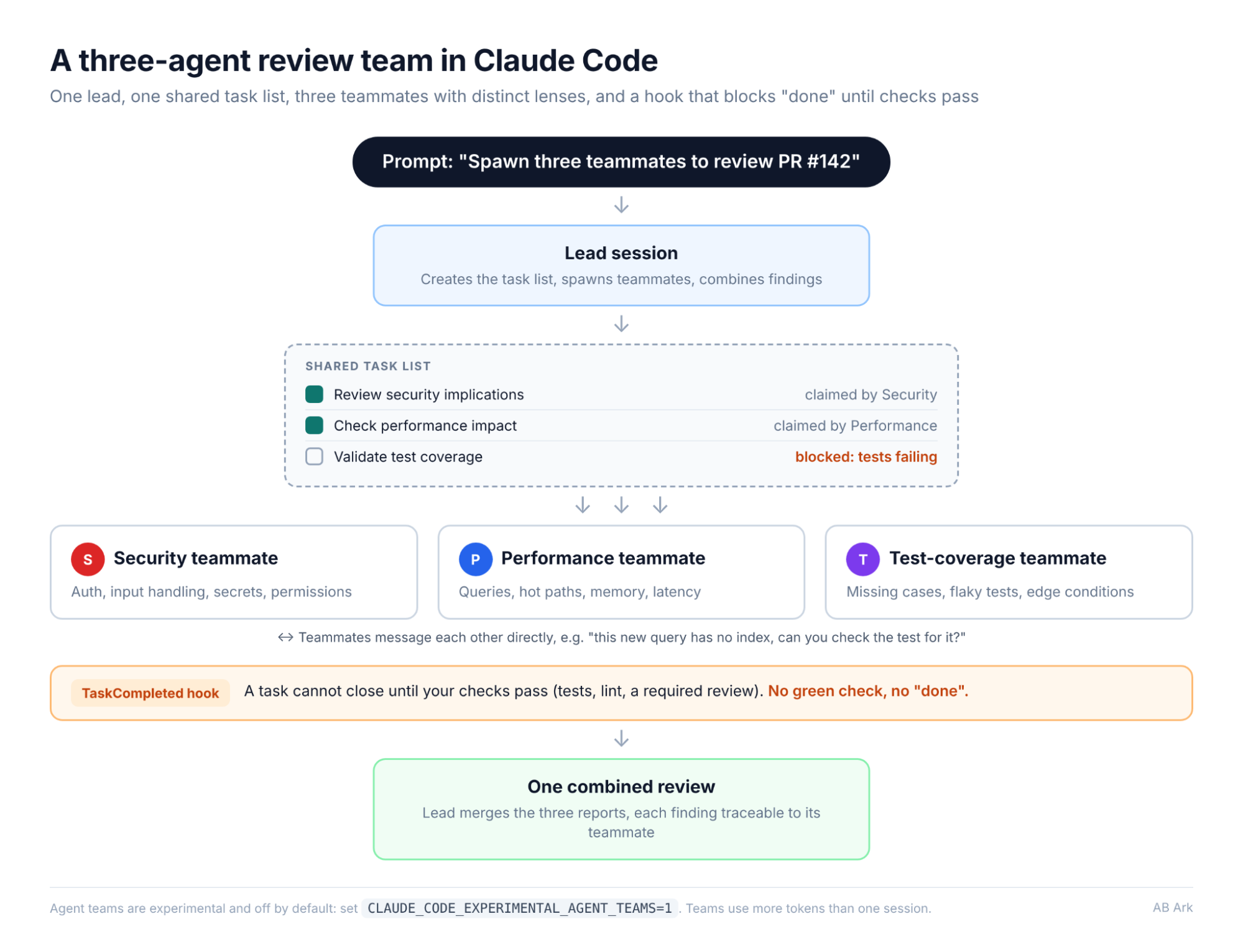
Then describe the team in plain language. Give each teammate a distinct lens so they do not overlap:
Spawn three teammates to review PR #142:
– one focused on security implications
– one checking performance impact
– one validating test coverage
Have them each review and report findings.
The lead creates a shared task list, teammates claim tasks and message each other, and the lead combines their findings. Use hooks such as TaskCompleted to block a task from closing until your checks pass. Teams use significantly more tokens than a single session, so the docs recommend starting with research and review before parallel implementation. OpenAI Codex offers a similar pattern: subagents that run in parallel and merge into one response, visible in the app and CLI.
From an IDE or ADE: one agent per worktree
In Cursor 3, /best-of-n runs the same task on several models, each in its own Git worktree, and /worktree isolates any agent. Google Antigravity has an Agent Manager that runs several agents in parallel from one dashboard. ADEs such as Warp, Conductor and Kepler (see GitKraken’s ADE round-up) add a board for many agents across tasks and repositories. Whichever surface you choose, keep one rule: never let two agents edit the same files, because they will overwrite each other.
How to Build an AI Agent Swarm You Can Audit
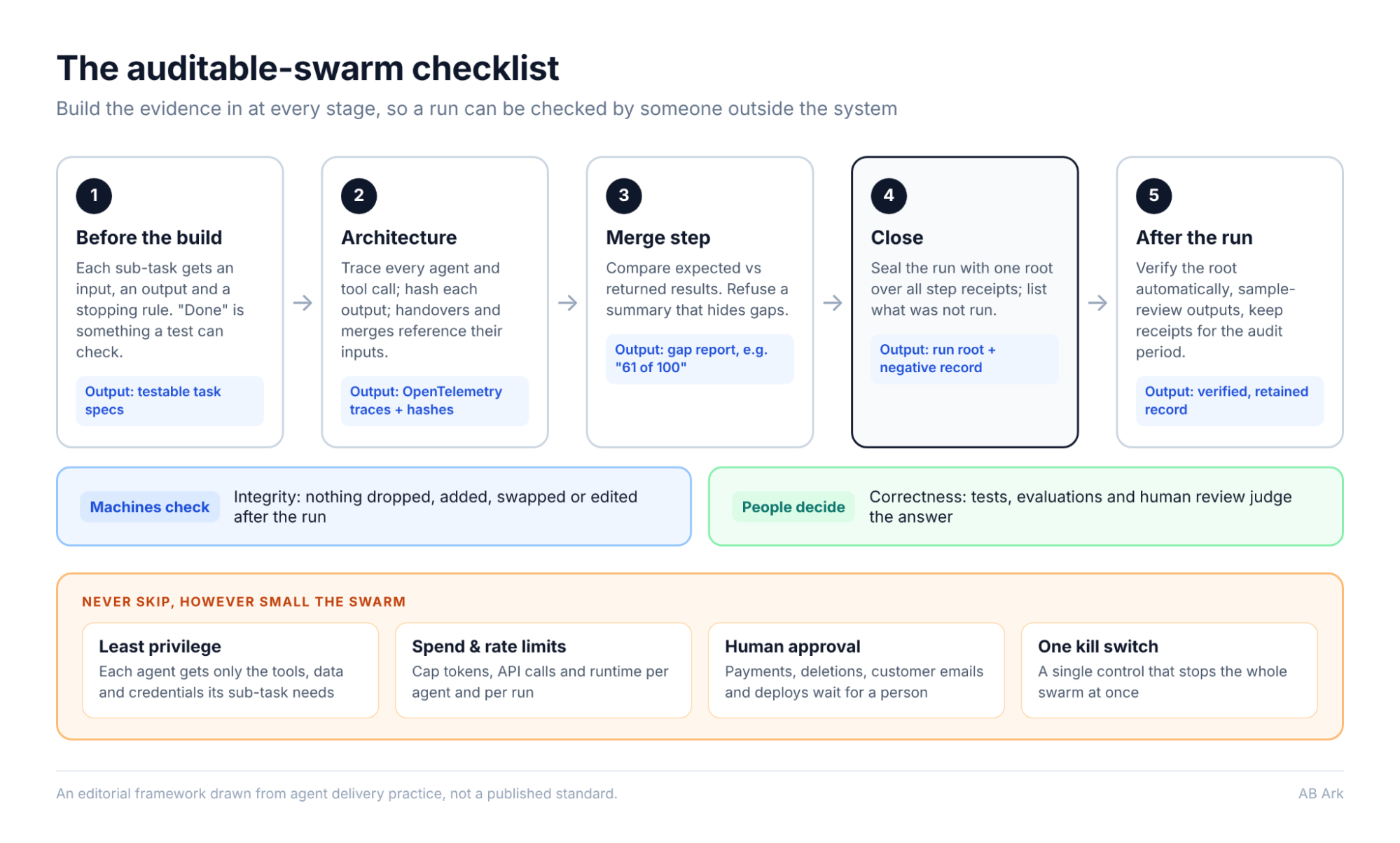
Verification works best when it is designed in from the first sprint, not added after the first incident. This is the AB Ark auditable-swarm checklist, an editorial framework drawn from agent delivery practice rather than a published standard:
| Stage | What to do | Why it matters |
|---|---|---|
| Before the build | Write every sub-task with a clear input, output and stopping rule; define “done” in a way a test can check | Specification issues were the largest failure category in the MAST study |
| Architecture | Export OpenTelemetry traces for every agent and tool call; give each output a hash; make handovers and merges reference their inputs | Creates evidence at the moment the work happens, not afterwards |
| Merge step | Compare expected against returned results; refuse to write a summary that hides gaps | Stops partial failures being presented as complete |
| Close | Seal each run with one root over all step receipts; list what was not run in a negative record | Makes dropped, added or swapped steps detectable |
| After the run | Verify the root automatically, sample-review outputs and keep receipts for the audit period | Integrity checks scale; correctness still needs people |
Never skip, however small the swarm:
- Least-privilege tool access: each agent gets only the tools, data and credentials its sub-task needs.
- Spend and rate limits: cap tokens, API calls and runtime per agent and per run, so a loop cannot run up a bill.
- Human approval for irreversible actions: payments, deletions, customer emails and production deployments wait for a person.
- One kill switch: a single control that stops the whole swarm, not one agent at a time.
An AB Ark Implementation Lens
AB Ark builds production AI systems, including the AI call agent and AI-powered Arabic proofreading projects listed in its case studies. The principle in this article applies to one agent handling customer calls as much as to a swarm of fifty: every action an agent takes on a client’s behalf should leave a record that someone outside the system can check. For teams moving from one agent to several, the cheapest moment to add tracing and a run-level seal is the first build sprint, not after the first incident.
FAQs
What is an AI agent swarm?
An AI agent swarm is a group of AI agents that work on parts of one goal at the same time. A coordinator splits the task, worker agents run the pieces in parallel using tools, and a merge step combines their outputs into one result.
How is an agent swarm different from a single AI agent?
A single agent works through a task in sequence and leaves one trail to follow. A swarm runs many agents in parallel, which is faster and covers more ground, but spreads the record across many agents, handovers and a merge step, so it is harder to audit.
What is the difference between an AI agent swarm and an AI agent team?
An agent team is a small, deliberate group, usually 3 to 5 agents with named roles, a lead and a shared task list. An agent swarm applies dozens to hundreds of agents to a problem, with AI deciding the size and make-up of the group. Teams are easier to review; swarms need machine-checkable records.
How do you build an agent swarm from the CLI, an IDE or an ADE?
From the CLI, tools such as Claude Code (agent teams, experimental) and OpenAI Codex (subagents) let a lead session spawn parallel agents. In an IDE, Cursor and Google Antigravity run agents side by side in isolated worktrees or cloud VMs. ADEs such as Warp, Conductor and Kepler give you one board to run and review many agents across tasks. Start with a small team, isolate each agent and add tracing from day one.
Why do AI agent swarms fail?
Research on multi-agent systems points to three causes: unclear task specifications, agents misreading or ignoring each other, and weak verification of whether the work is actually finished. In a swarm, merging outputs can also hide partial failures and missing results.
How do you verify what an AI agent swarm did?
Trace every agent and tool call with OpenTelemetry, keep the records in tamper-evident storage, and for higher-stakes work seal each run with hashes and one Merkle root over all steps, as the AER-1 proposal describes. A verifier can then recompute the hashes and root to confirm nothing was dropped, added or changed.
Do execution receipts prove the swarm’s answer is correct?
No. Receipts prove that the saved record of what the agents did is unaltered and complete. Whether the answer is right still depends on tests, evaluations and human review.
The Rule for Running an AI Agent Swarm
Start with a small team, not a swarm, and scale only when the work is well specified and testable. Whatever the size, never let the agents be the only witness to what they did: trace every step, isolate every agent, seal each run so the record cannot quietly change, and write down what was not done. Then let tests and people judge whether the answer is right.
A swarm you cannot check is a swarm you have to take on trust. A good record turns “the agents say it’s done” into “here is what they did.”
Schedule a Free Consultation Call ->
Head Of Engineering Department